A 2 GB video. Someone needed it on S3 from a phone. The fast fix was a bucket policy with Principal: "*". The upload worked. So did every other key in the bucket, for as long as that policy stayed.
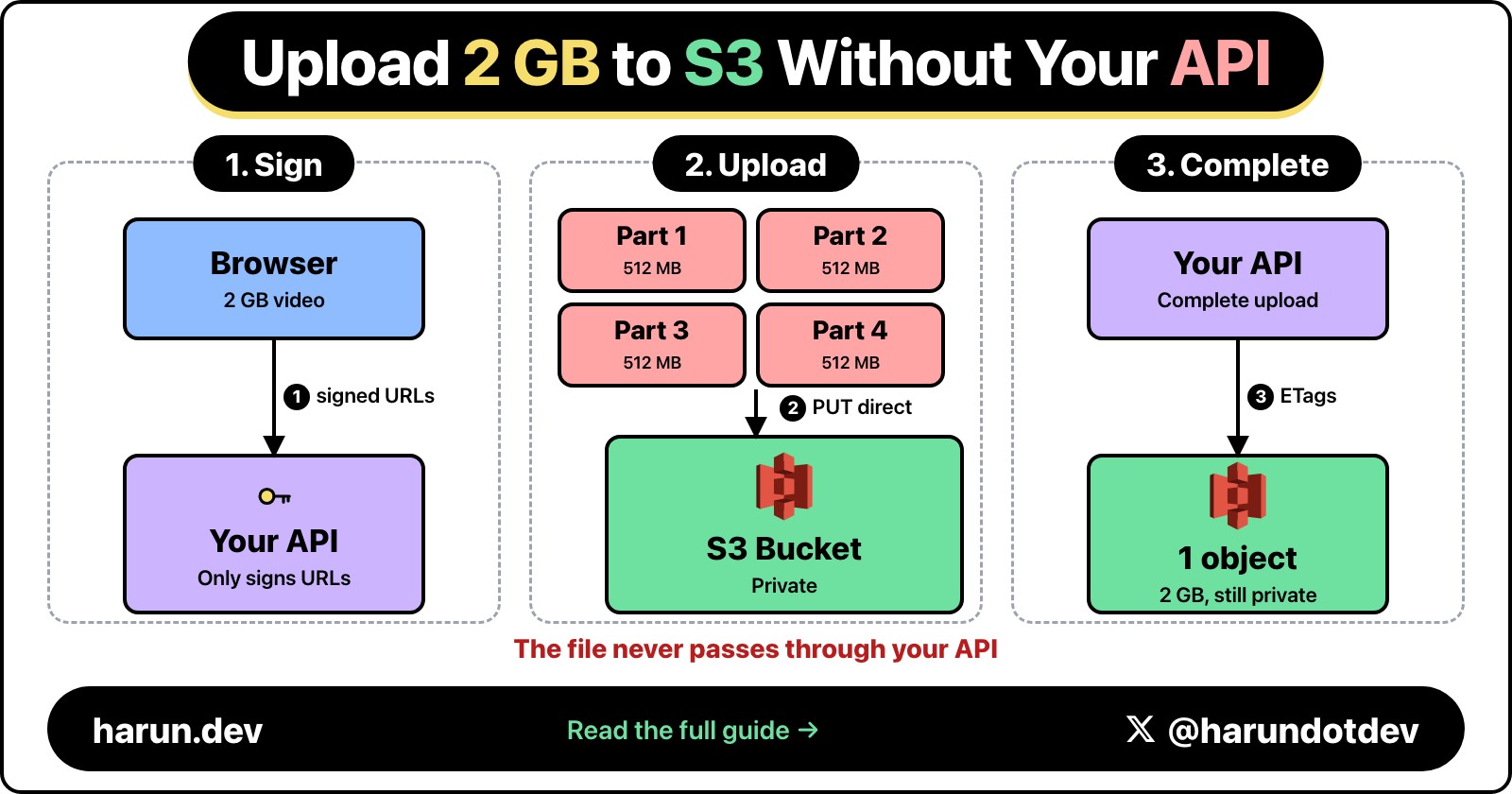
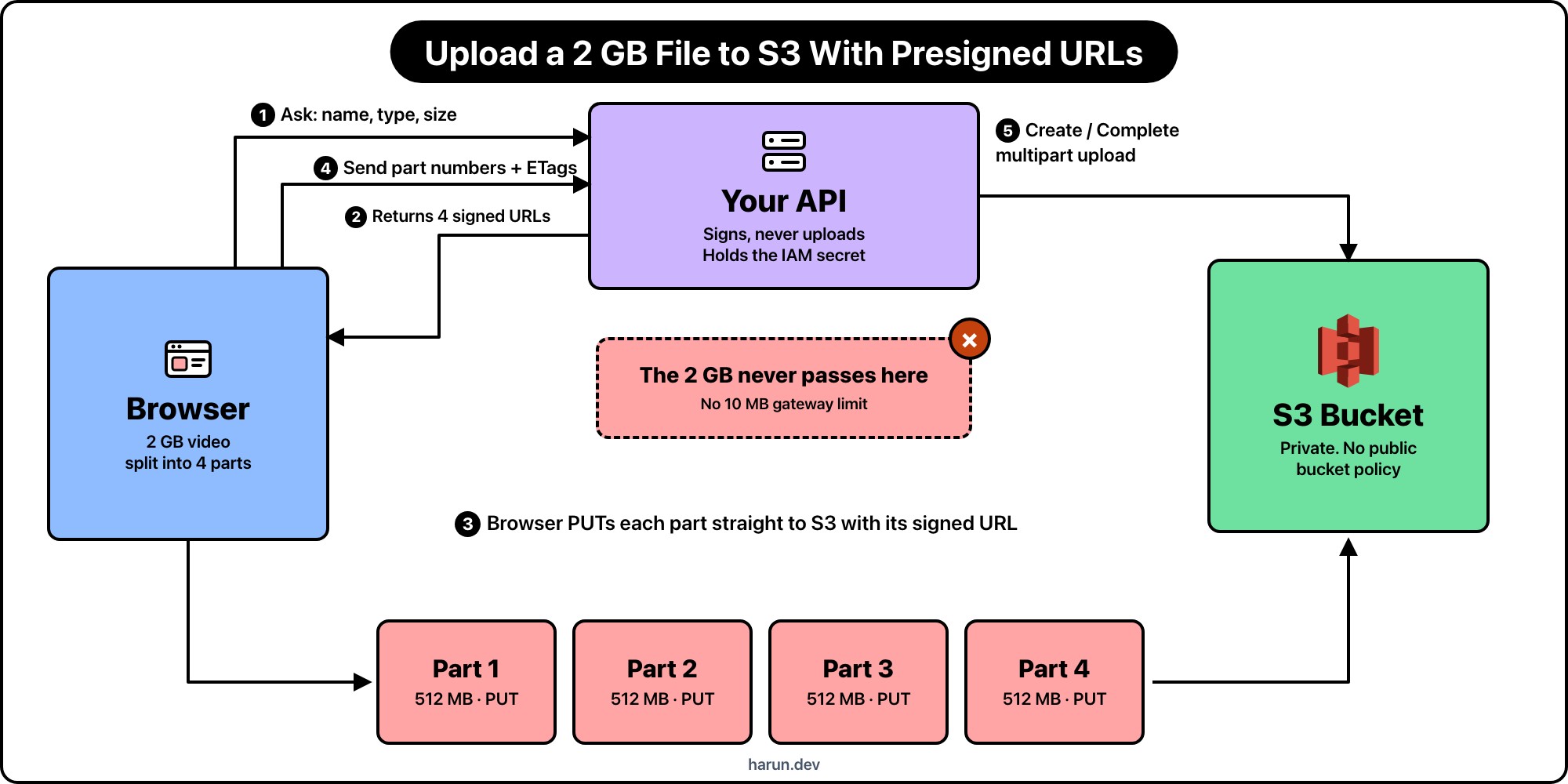
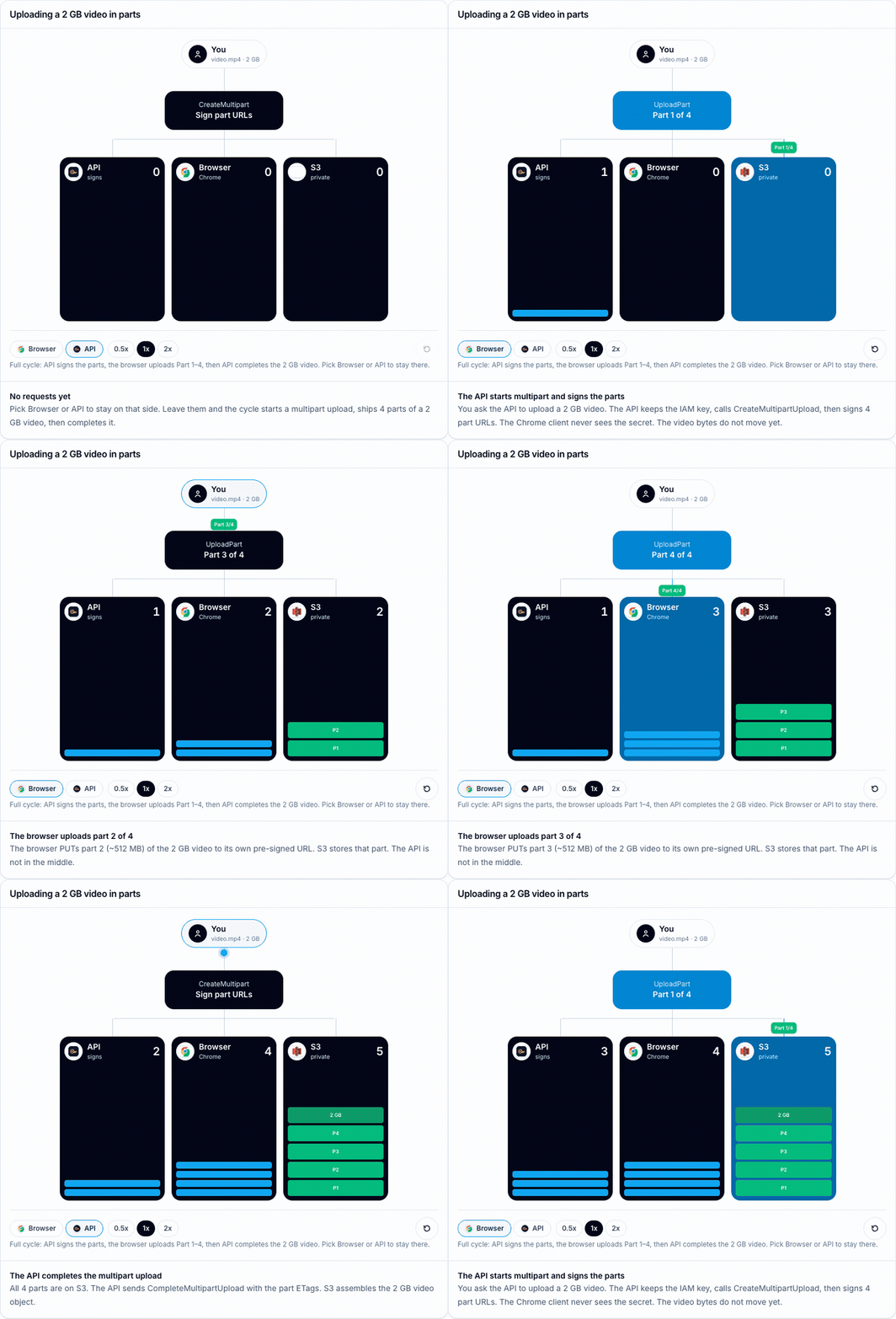
A pre-signed URL is the narrower tool. For a file this size you do not sign one giant PUT. The API starts a multipart upload, signs each part, and the browser PUTs those parts straight to S3. The object stays private. The figure below is that cycle as a small game: watch the parts land, or lock Browser or API and see what each side does.
Your API only signs and completes. The 2 GB of bytes go from the browser to S3 and never pass through the API.
The figure starts when it is on screen. First the API creates the multipart upload and signs the part URLs. Then the browser uploads Part 1 through Part 4 of the 2 GB video. Then the API completes the upload so S3 assembles the object. Choose Browser or API and it stays on that side. Click the selected one again to return to the full cycle. Speed and reset sit at the bottom.
The tempting shape is: browser posts the video to your API, the API writes it to S3 with the AWS SDK, and you call it done. That shape breaks once the file is measured in gigabytes.
API Gateway has a hard 10 MB payload limit. A Lambda behind it times out at 15 minutes and still has to hold the body while it streams to S3. You pay for the ingress into the API and the egress out to S3. A small EC2 or container box has the same problem: two hops, double bandwidth, and a socket that dies when the phone drops wifi mid-upload.
The other failure mode is credentials. If the browser talks to S3 with a long-lived access key, that key leaves your VPC. A pre-signed part URL is temporary permission for one part. The IAM secret never ships to the client.
The requests that make a multipart cycle
A 2 GB video is not one PUT. S3 multipart splits it into parts (minimum 5 MB except the last part). In the figure I use four parts of about 512 MB each so you can see them stack.
Step
Who
What moves
What S3 sees
1
Browser → your API
JSON: filename, content type, size
Nothing yet
2
Your API → S3 + signing library
CreateMultipartUpload, then SigV4 over each UploadPart
An open multipart upload id
3
Browser → S3
PUT part 1…N to each signed URL (~512 MB each)
Parts land with ETags
4
Browser → your API → S3
Part numbers + ETags
CompleteMultipartUpload assembles the 2 GB object
Steps 1, 2, and 4 are small on purpose. The API checks auth, picks a key like uploads/hrr_export/2026-10-08/video.mp4, opens the multipart upload, and returns signed part URLs. Step 3 is the only place the video bytes go. In the figure, the Lambda column is the signing and the complete. The Browser column plus the part bars on S3 are the uploads. The final 2 GB bar is the assembled object.
If you lock Browser before any multipart session has started, the figure shows a 403. That matches a real bucket with Block Public Access on and no signature in the query string.
How each part signature is built
The API holds the IAM credentials. The browser does not. Each part URL is Signature Version 4 over a specific UploadPart request: method, bucket, key, upload id, part number, region, time window, and the headers you chose to sign.
You will see the usual query params on every part URL:
X-Amz-Algorithm: always AWS4-HMAC-SHA256 for SigV4.
X-Amz-Credential: access key id, date, region, service (s3), and the literal aws4_request.
X-Amz-Date: when the signature was created, in UTC.
X-Amz-Expires: lifetime in seconds from that date. Parts of a 2 GB video need enough time for a slow mobile link. I still keep this in minutes or a couple of hours, not days.
X-Amz-SignedHeaders: which headers were part of the string to sign. Often just host for part uploads.
X-Amz-Signature: the hex HMAC. Change the part number, the upload id, or the key and S3 rejects that part.
The upload id from CreateMultipartUpload ties the parts together. A signature for part 2 will not write part 3. A complete call with the wrong ETag list fails. That is the point: each URL is one part of one object, not a key to the bucket.
The API that starts multipart and signs the parts
This is the shape I use with the AWS SDK for JavaScript v3. The handler never sees the video body.
getSignedUrl builds the canonical request for each part, derives the signing key from the IAM secret, and appends the X-Amz-* query params. The role on this Lambda needs s3:CreateMultipartUpload, s3:UploadPart (for signing), and s3:CompleteMultipartUpload on that prefix. It does not need to read the video bytes.
The browser that uploads the parts
The browser slices the 2 GB file, PUTs each slice to its signed URL, and keeps the ETag S3 returns. No AWS SDK in the client. The query string is the auth.
async function hrr_uploadVideoParts(
  file: File,
  partUrls: string[],
) {
  const partSize = Math.ceil(file.size / partUrls.length);
  const parts: { ETag: string; PartNumber: number }[] = [];

  for (let index = 0; index < partUrls.length; index += 1) {
    const start = index * partSize;
    const blob = file.slice(start, start + partSize);
    const response = await fetch(partUrls[index], {
      method: "PUT",
      body: blob,
    });

    if (!response.ok) {
      throw new Error(`Part ${index + 1} failed: ${response.status}`);
    }

    const etag = response.headers.get("ETag");
    if (!etag) {
      throw new Error(`Part ${index + 1} missing ETag`);
    }

    parts.push({ ETag: etag, PartNumber: index + 1 });
  }

  return parts;
}
After every part succeeds, the browser posts the ETag list back to your API so it can call CompleteMultipartUpload. Until that call, S3 still holds loose parts, not a finished object. If the phone dies mid-upload, you can resume from the next missing part instead of restarting the whole 2 GB.
CORS still matters. The bucket needs a rule that allows PUT from your origin, and it must expose ETag so the browser can read it. The pre-signed URL does not replace CORS. It replaces long-lived credentials.
Is this secure?
Yes, when you keep the bucket private and you treat each part URL as a short-lived ticket for one slice of one object. It is more secure than shipping IAM keys to Chrome, and more secure than opening the bucket with Principal: "*".
It is not magic. A leaked part URL still lets whoever has it upload that one part until expiry. Security here is narrow permission plus a short clock, not "the URL is secret forever."
How?
The IAM access key and secret stay on the API. Chrome only receives signed URLs. Those URLs encode SigV4 over a fixed request: this bucket, this key, this multipart upload id, this part number, this expiry. Change any of those and the signature stops matching, so S3 returns 403.
That is what the figure is showing. Lock Browser before the API has signed anything and S3 denies the upload. After the API signs, Chrome can PUT parts, but it still cannot list the bucket, read other keys, or complete the multipart upload without another call that only the API is allowed to make.
A few habits keep that promise honest:
Leave Block Public Access on. Do not open the bucket to make the upload "just work."
Sign only the part numbers you need. Prefer one set of part URLs per upload attempt.
Keep X-Amz-Expires short enough for a slow mobile upload, not for a week of Slack forwards.
On cancel or failure, call AbortMultipartUpload so incomplete parts do not sit around.
Treat a pasted part URL like a temporary password for one slice. Log when you mint them.
A part URL will not list objects. It will not write a different key or a different part number. It will not switch from PUT to GET or DELETE. Completing or aborting the multipart upload stays on the API.
Keep the bucket private
I do not open the bucket to get a 2 GB video uploaded. A public bucket would accept those PUTs tomorrow, and every other key too. Block Public Access on the account is there because this fix keeps coming back.
I still make an object public when it is meant to be public: a cover image, a package on a CDN, something I would put on a website without a login. A customer's video export is not that. Upload with pre-signed multipart parts. Read it later with a short-lived pre-signed GET, or serve it through CloudFront with an origin access control. Those are separate decisions from the upload.
The 2 GB video in the figure goes from Chrome to S3 in parts. The API holds the key, starts the multipart upload, signs each part, completes the object, and stays out of the byte path. That is the whole reason to use pre-signed URLs for big static files: narrow permission, resumable parts, no proxy in the middle.
Hope you enjoyed this one. If a multipart part has bitten you on a missing ETag header in CORS, find me on X at https://x.com/harundotdev, and grab every other link from my bio at https://harun.dev/bio.
On this post
Comments
A reply stays under the note it answers.
No comments yet.
If you have a note on Why You Should Use S3 Presigned URLs to Upload Big Static Files, sign in and leave it.