Why Your Terraform State Is More Sensitive Than Your .env File
Terraform state can contain passwords, access keys, and a map of your infrastructure. Here is how I keep it out of Git, lock it in S3, and limit who can read it.
Most developers know not to commit a .env file. It goes into .gitignore, CI gets its own secrets, and anyone who pastes one into Slack gets a polite lecture.
Then the same team leaves terraform.tfstate on a laptop, copies it into a CI artifact, or gives every developer read access to the production state bucket.
That file deserves at least as much care as .env. Sometimes more.
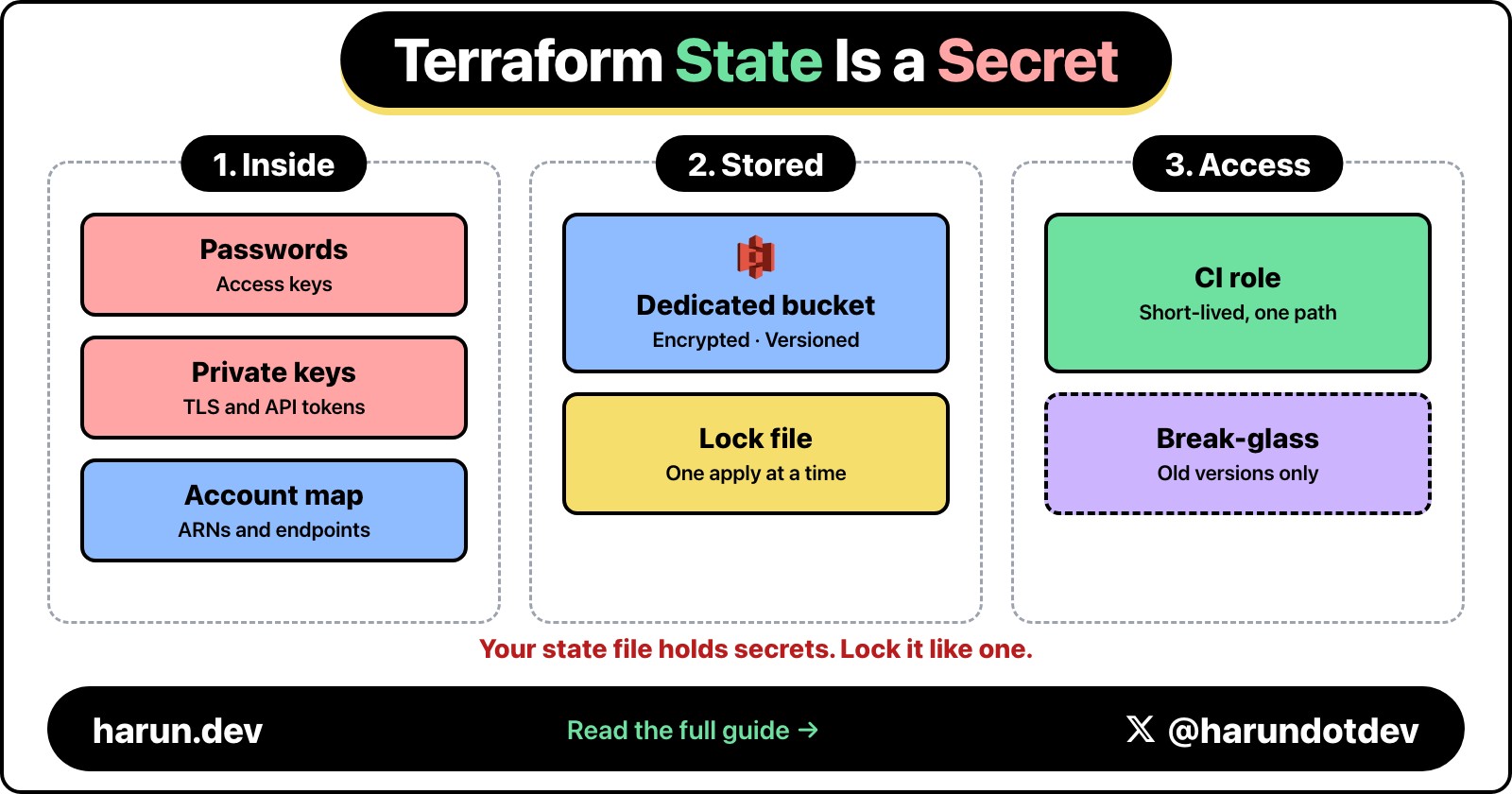
Terraform state can contain database passwords, generated access keys, private key material, connection strings, and values returned by data sources. Even when there are no credentials in it, state is a detailed map of the account: resource names, ARNs, network IDs, endpoints, roles, and relationships.
The dangerous part is that Terraform makes sensitive values look safer than they are.
Terraform state holds secrets, so it belongs in a locked, encrypted S3 backend with narrow read access, not in Git or on a laptop.
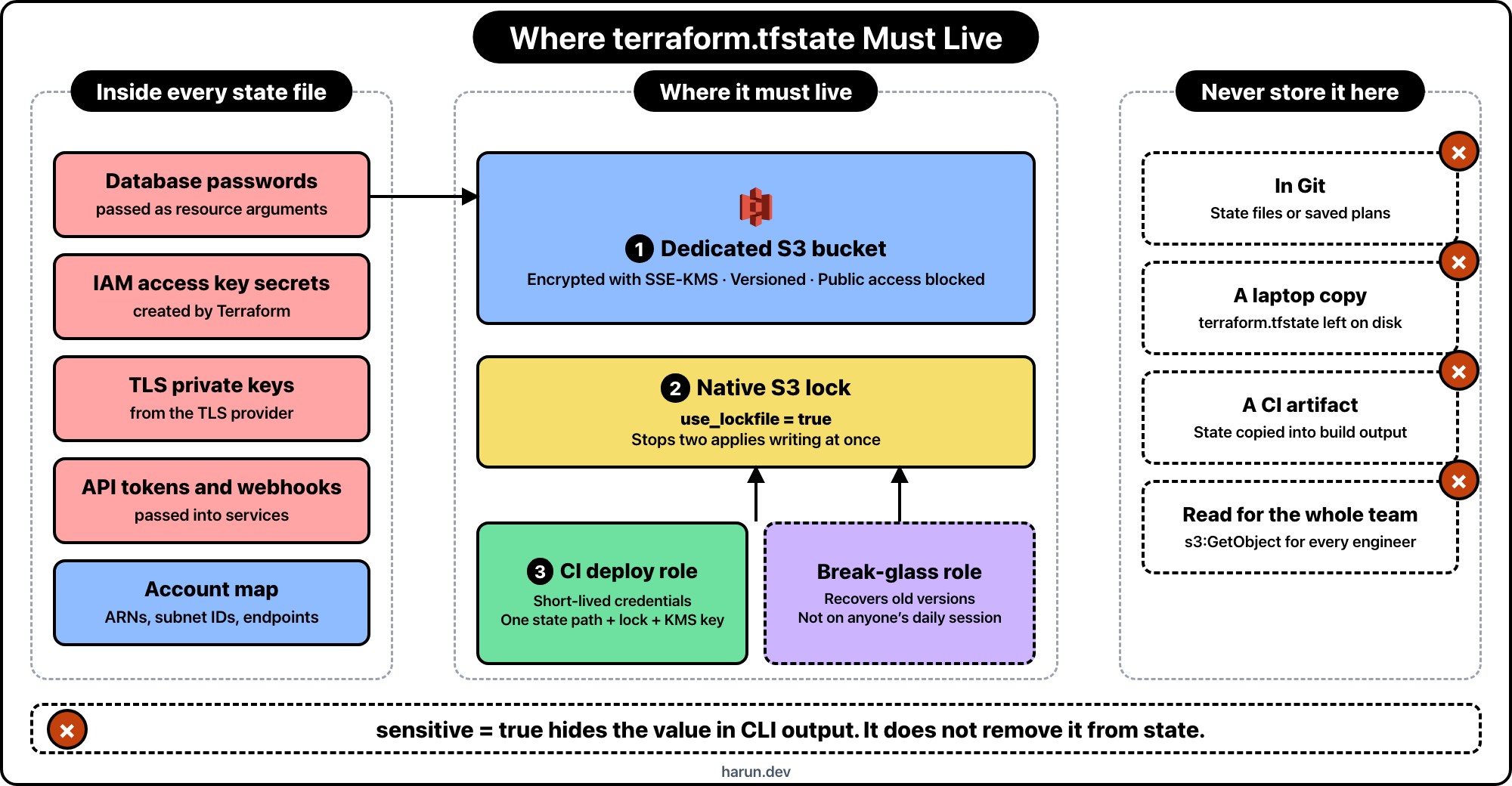
Marking the variable as sensitive stops Terraform from printing its value in the usual CLI and HCP Terraform output. It does not automatically remove the value from state.
Terraform needs resource attributes so it can compare the configuration with the real resource later. The state snapshot is JSON, and many providers store sensitive arguments there. HashiCorp says this directly in its sensitive data documentation: sensitive values are redacted in output, while state access still needs to be controlled.
This distinction is easy to miss:
Sensitive means “do not display this in normal output.”
Ephemeral means “do not store this in state or plan files.”
Those are different promises.
What I assume is inside every state file
I treat a state snapshot as if it contains credentials, even when I think the configuration only creates harmless infrastructure.
That assumption holds up better than checking the file once and declaring it clean. Providers change. Modules add outputs. A resource that stored only an ARN last month may gain a password argument next month. Someone may read a secret through a data source while debugging and forget that Terraform recorded the result.
A production state file commonly exposes some mix of:
database usernames and passwords passed through resource arguments
IAM access key secrets created by Terraform
private keys generated by the TLS provider
API tokens and webhook URLs passed into services
internal hostnames, subnet IDs, security groups, and account IDs
Lambda environment variables and application configuration
Not every resource stores every value. Provider schemas decide that. I don't use that uncertainty as a security boundary.
My minimum S3 backend
For AWS projects, I usually keep state in a dedicated S3 bucket. The bucket isn't shared with uploads, logs, or application assets. Its only job is holding Terraform state.
This is the backend configuration in the application stack:
use_lockfile = true turns on native S3 state locking. It requires Terraform 1.10 or newer. Older setups often use a DynamoDB table for locking, but that mechanism is now deprecated. New projects don't need the extra table.
Locking is not encryption. It prevents two applies from writing the same state at once. Without it, two correct changes can still leave one broken state snapshot.
I create the backend bucket in a small bootstrap stack, separate from the application. The important parts look like this:
S3 already encrypts new objects with SSE-S3 by default. I use a customer-managed KMS key here because it gives me a second permission boundary and an audit trail for key usage. It also creates another failure mode: deleting or disabling the KMS key makes the state unreadable. That is why the key gets deletion protection too.
Versioning is the recovery path. If a bad apply or manual command overwrites state, an earlier object version is still available. State locking prevents concurrent writers; versioning helps after a bad write. I want both.
Read access is secret access
The most common mistake I see after moving state to S3 is a policy that gives the whole engineering team s3:GetObject on the bucket.
Remote doesn't mean secure. It only means the file moved.
My production CI role gets access to one state path, its lock file, and the matching KMS key. It does not get access to every application's state. A simplified S3 policy looks like this:
The role also needs narrowly scoped kms:Encrypt, kms:Decrypt, kms:GenerateDataKey, and kms:DescribeKey permissions on the state key.
Notice that the policy can delete the lock file, but not the state object. Normal Terraform runs need to release locks. They do not need permission to delete production state.
I keep human write access out of the normal path. CI assumes the deployment role through short-lived credentials. A break-glass role can recover old versions, but that role isn't attached to anyone's everyday AWS session.
Separate environments by access boundary
I don't put development and production in the same state just because Terraform workspaces make that convenient.
Workspaces separate state snapshots. They do not create separate IAM boundaries. If the same role can read the backend, a developer who needs development state may also be one policy mistake away from production state.
For small systems, separate prefixes plus precise IAM policies can be enough. For higher-risk systems, I use separate buckets or AWS accounts. The useful rule is simple: if two environments need different people or roles, give them different backend access boundaries.
I also avoid using terraform_remote_state as a general-purpose data API. A configuration may expose only selected outputs, but the caller's backend credentials can still read the full state snapshot. If another stack needs a VPC ID, I would rather publish that ID to SSM Parameter Store than grant access to the VPC's entire state.
Keep new secrets out of state
Protecting the backend matters, but the best secret in state is the one that was never written there.
My first choice is letting AWS own the credential. For RDS, that can mean setting manage_master_user_password = true so RDS keeps the master password in Secrets Manager instead of passing a password through the normal Terraform argument.
Terraform 1.11 also added write-only resource arguments. The AWS provider supports password_wo on aws_db_instance, for example. Write-only arguments receive a value during the operation and omit it from plan and state files.
This needs Terraform 1.11 or newer and a provider resource that supports the write-only argument. The version field is how Terraform knows that the unseen value should be updated.
Ephemeral and write-only values reduce what lands in new snapshots. They don't clean old versions. If a password existed in state before the change, I assume it still exists in S3 version history and rotate it.
If state leaks, deleting the file is not enough
A leaked .env file starts a credential rotation. A leaked state file should start the same process, plus an infrastructure review.
Remove public or unauthorized access to the backend.
Preserve audit evidence instead of blindly deleting everything.
Rotate every credential that may have appeared in the snapshot or its older versions.
Review CloudTrail for state object and KMS key access.
Check CI artifacts, local backups, pull requests, and chat uploads for copies.
Move supported secrets to managed, ephemeral, or write-only paths.
Deleting the current S3 object does not revoke a database password. Rewriting Git history does not revoke an IAM access key. Cleanup matters, but rotation closes the door.
The checklist I use before the first production apply
Remote backend dedicated to Terraform state
S3 Versioning enabled
Native S3 locking enabled with use_lockfile = true
Public access blocked and TLS enforced by bucket policy
SSE-KMS enabled with deletion protection on the key
Separate backend paths and roles per environment
CI using short-lived credentials, not stored access keys
No state files or saved plans in Git and CI artifacts
Secrets Manager, managed passwords, or write-only arguments used where supported
CloudTrail available for S3 and KMS investigations
Terraform state is not a cache and it is not harmless deployment metadata. It is part of the production control plane. I secure it like a secrets store, back it up like a database, and restrict writes like a deployment system.
The .env file still belongs in .gitignore. Add *.tfstate* while you're there, then make sure the real state lives somewhere worthy of what is inside it.
Hope you enjoyed this one. If you want more practical AWS and Terraform notes, find me on X at https://x.com/harundotdev.
On this post
Comments
A reply stays under the note it answers.
No comments yet.
If you have a note on Why Your Terraform State Is More Sensitive Than Your .env File, sign in and leave it.