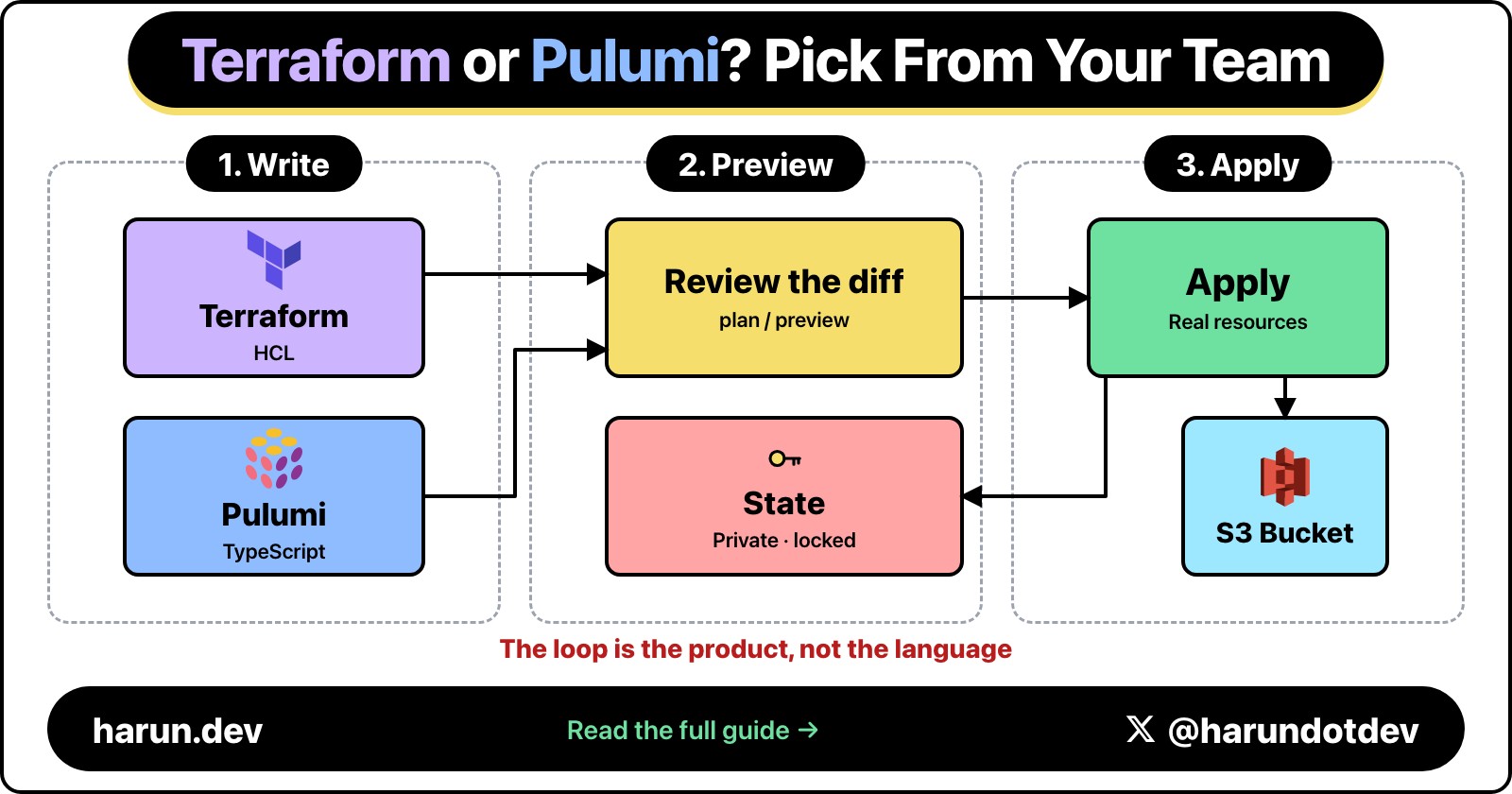
Terraform or Pulumi, Pick From the Team You Have
Both tools preview a change, apply it, and write state. Two terminals show the same deploy. Pick from the team that has to review it.
TerraformAWSDevops
Both tools preview a change, apply it, and write state. Two terminals show the same deploy. Pick from the team that has to review it.
The argument started as a logo fight. Terraform on one side, Pulumi on the other, as if the cloud would behave once we picked the right binary.
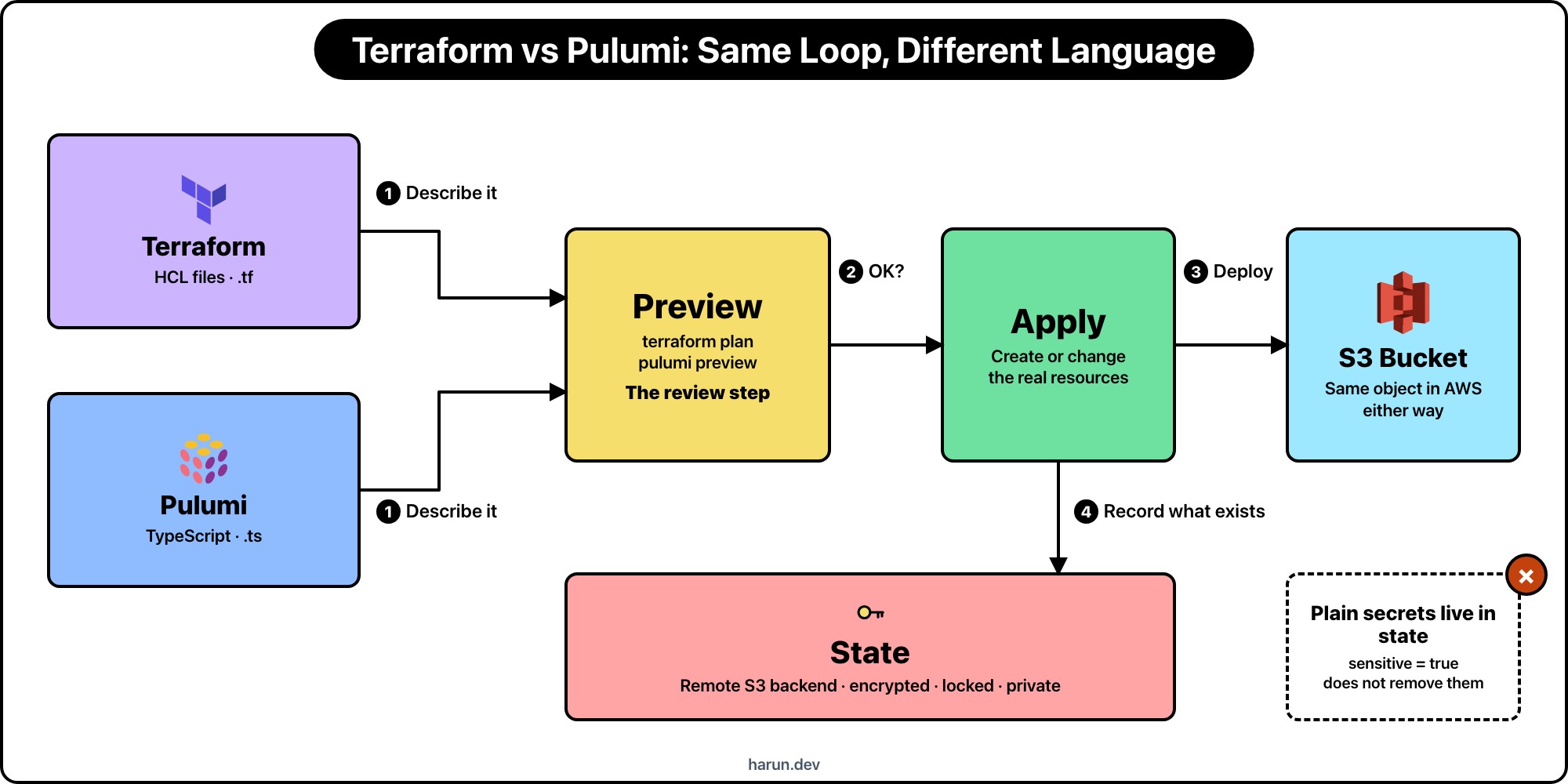
Both tools do the same loop. You describe the resources. You preview. You apply. State records what actually exists. The two terminals below run that deploy side by side for the same S3 bucket. Speed and reset sit at the bottom.
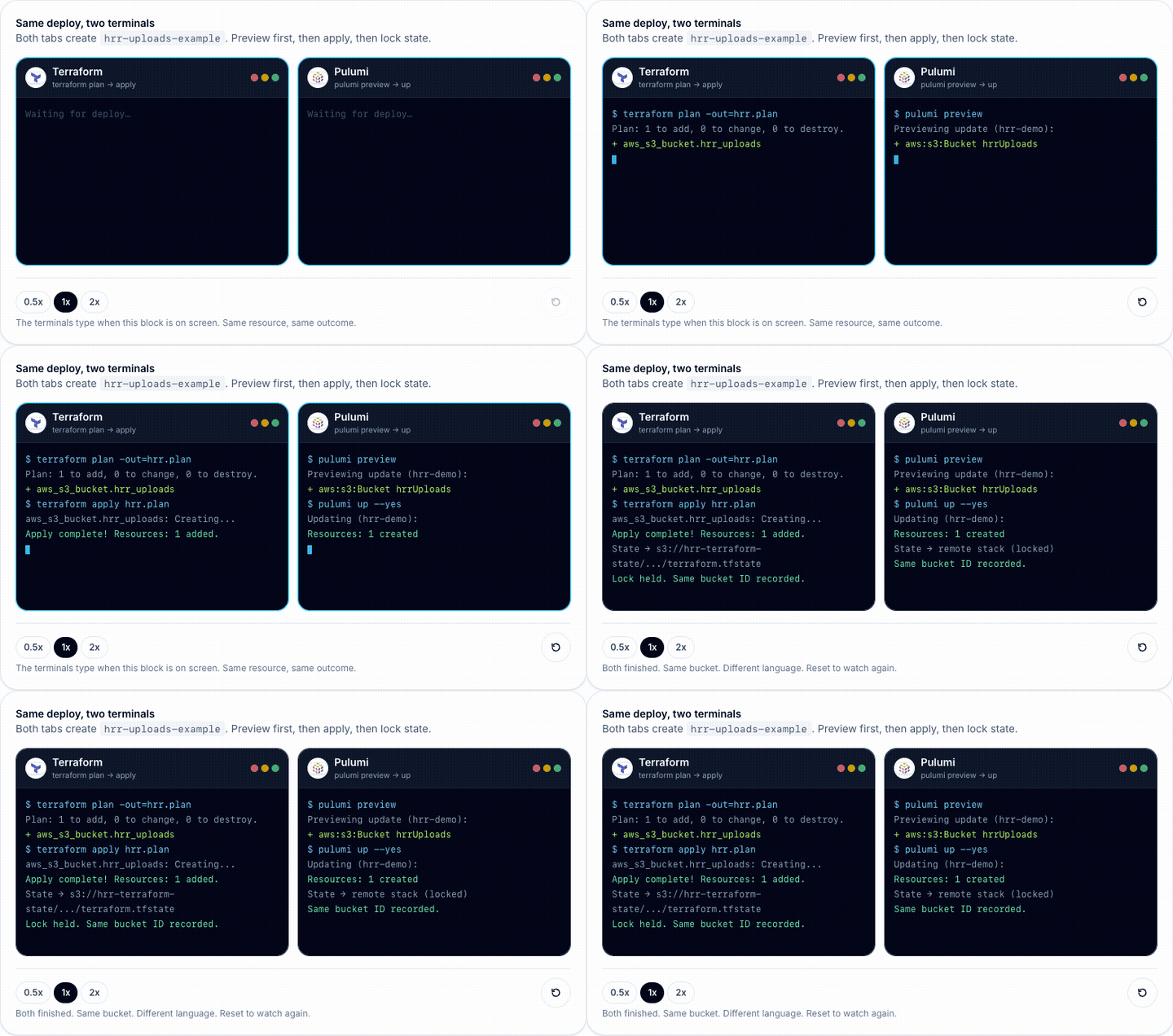
This figure is interactive on the original post, where you can play with it live. Open the interactive demo on harun.dev.
I stop people when the debate is only about HCL versus TypeScript. The product is the loop. Pulumi can now run existing Terraform HCL too (runtime: hcl), so even the language is no longer a hard line:
| Step |  Terraform Terraform |
 Pulumi Pulumi |
What you are checking |
|---|---|---|---|
| Describe | main.tf / modules |
index.ts (or Python, Go, HCL, …) |
Desired state is readable by the people who must review it |
| Preview | terraform plan |
pulumi preview |
Creates, updates, and deletes before anything changes |
| Apply | terraform apply |
pulumi up |
Cloud APIs run with credentials you intended |
| State | terraform.tfstate (remote) |
stack state (remote) | Real IDs, and often secrets, stay locked down |
Miss the preview and you get surprise destroys. Miss the state lock and two applies race. Miss who can read state and you leak database passwords. The CLI brand does not fix those.
Here is an S3 bucket both ways. Prefixes stay hrr_.
resource "aws_s3_bucket" "hrr_uploads" {
  bucket = "hrr-uploads-example"

  tags = {
    Project = "hrr-demo"
  }
}
import * as aws from "@pulumi/aws";

const hrrUploads = new aws.s3.Bucket("hrrUploads", {
  bucket: "hrr-uploads-example",
  tags: {
    Project: "hrr-demo",
  },
});
Same object in AWS after apply. The review question is who can read the diff in the pull request. If half the reviewers do not write TypeScript, the Pulumi preview is noise. Pulumi can also run your existing .tf files through its HCL runtime, which softens that gap. It is new, so try it on a non-critical stack first. If the app team already owns the account and the repo, HCL is the foreign language.
Both tools need a memory of what they created. That memory is more sensitive than a .env file, and switching CLIs does not delete the risk. It renames the file.
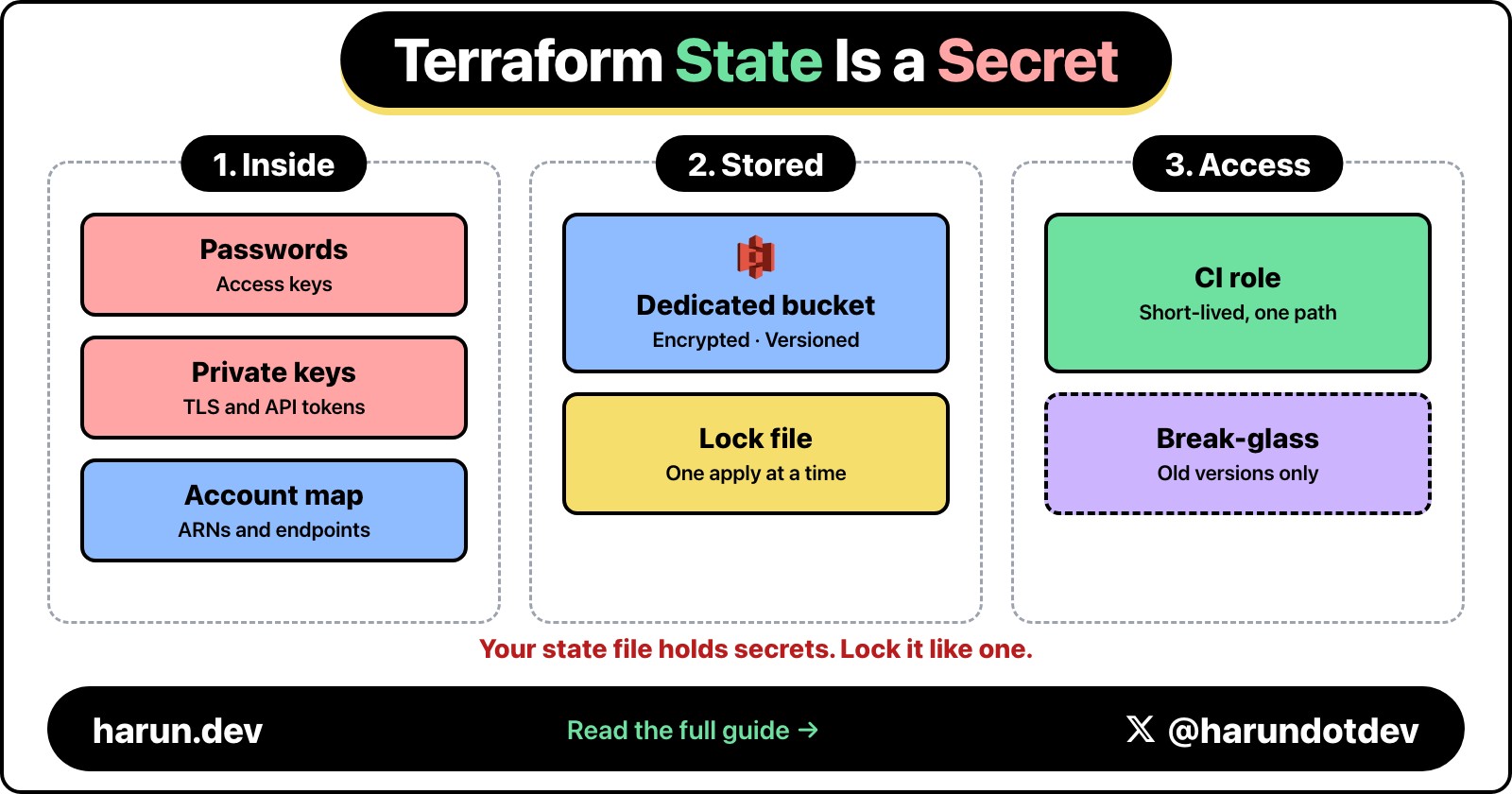
terraform.tfstate is JSON that maps your configuration to real cloud objects. After an apply it commonly holds:
Marking a variable sensitive = true hides it from normal CLI output. It does not remove the value from state. Terraform needs those attributes to plan the next diff. Treat every production state snapshot as if it contains credentials, even when last month's file looked clean. Providers change. Modules grow. A data source you used while debugging can leave a secret behind.
Two operators applying at once without a lock can corrupt that file. A state file in git, in a CI artifact, or in a bucket every developer can read is a credential dump with a map of your account attached. I wrote the fuller Terraform treatment in Why Your Terraform State Is More Sensitive Than Your .env File.
My minimum remote backend looks like this:
terraform {
  backend "s3" {
    bucket       = "hrr-terraform-state"
    key          = "demo/production/terraform.tfstate"
    region       = "us-east-1"
    encrypt      = true
    use_lockfile = true
  }
}
Dedicated bucket. Encryption on. Lock on. Read access only for the people and CI roles that must run plan and apply. Not the uploads bucket. Not a laptop copy "just for today."
Pulumi's equivalent is stack state. Same job as Terraform state: remember which cloud objects belong to this stack so the next preview and up are honest.
Where it lives depends on the backend you chose: Pulumi Cloud, an S3/DIY backend, or another supported store. The product name changes. The contents do not get safer. Stack state still carries resource identities and can carry secrets from configuration and provider outputs. Pulumi can encrypt secret values in state and config, which is useful. Encryption at rest is not the same as "anyone on the team can download the stack export."
So I apply the same rules:
What is not the same: the file format, the CLI commands, and the migration path. You do not "rename" terraform.tfstate into a Pulumi stack and call it done. Importing or rebuilding state is a project of its own. The caveat that transfers is the security model, not the bytes on disk.
In the terminals above, both sides end on a locked remote state line for a reason. The green "1 added" / "1 created" is incomplete until that record is somewhere you would trust with a production password.
terraform plan and pulumi preview are the diff. I do not apply from a laptop against production without that diff in the pull request. CI should run the preview on every change that touches infra. Humans read the create/update/delete list. The language of the description changes who can read it. It does not remove the need for one.
When the plan says destroy on a database, stop. When the preview is empty and you expected a change, stop. The green "1 added" / "1 created" lines in the terminals only show up after that gate. Apply is only honest after it.
Pick from the team you have, not the conference talk you liked.
I have used both. The outages I remember came from state that anyone could read, and from an apply that nobody previewed. They did not come from the extension on the file.
Hope you enjoyed this one. If your team is mid-argument about this, find me on X at https://x.com/harundotdev, and grab every other link from my bio at https://harun.dev/bio.
I email when a new post goes up. One send a week, and only if there's something new.
Want this applied on your account? Start with Infrastructure as Code.
Related reading
Kept below the post instead of in a sidebar, with a slow continuous motion for a cleaner editorial feel.
Sep 19, 2026
Terraform state can contain passwords, access keys, and a map of your infrastructure. Here is how I keep it out of Git, lock it in S3, and limit who can read it.

Jul 7, 2026
AI agents write code fast. They also write bugs, security holes, and nonsense. Here is the 12-item checklist I run before merging anything an agent touched.
Jun 3, 2026
How I use AI as a first-pass reviewer for Terraform and Lambda pull requests, while keeping human judgment on the risky parts
Sep 19, 2026
Terraform state can contain passwords, access keys, and a map of your infrastructure. Here is how I keep it out of Git, lock it in S3, and limit who can read it.
Jul 7, 2026
AI agents write code fast. They also write bugs, security holes, and nonsense. Here is the 12-item checklist I run before merging anything an agent touched.
Jun 3, 2026
How I use AI as a first-pass reviewer for Terraform and Lambda pull requests, while keeping human judgment on the risky parts
On this post
Comments
A reply stays under the note it answers.
No comments yet.
If you have a note on Terraform or Pulumi, Pick From the Team You Have, sign in and leave it.