Why Bref Instead of Vapor
Laravel Vapor is the official serverless deployment tool for Laravel. It works. I've used it on two client projects. But it costs $399 per year just for the subscription, and on top of that you're still paying for all the AWS resources underneath. What bothered me most wasn't the price though. It was the abstraction. Vapor manages your infrastructure behind the scenes, and when something goes sideways at 1am, you're digging through Vapor's CloudFormation stacks trying to figure out what it actually provisioned. I wanted more control.
So I started looking for alternatives. Bref has been around for a while now. It's an open-source project that gives you PHP runtimes for AWS Lambda. You get the same serverless model as Vapor, but you own every single piece of infrastructure. And because it's just Lambda layers, you can wire everything up with whatever IaC tool you prefer.
This post walks through deploying a full Laravel application to Lambda using Bref and Terraform. I'm talking the whole setup. Aurora Serverless v2 for Postgres, ElastiCache Serverless for Redis, SQS for queues, EventBridge for cron, S3 for uploads. If you've read my previous posts, some of this architecture will look familiar. In Serverless SaaS on AWS Lambda with Fastify I covered many of the same Lambda patterns but with Node.js. And in Deploying a Laravel Application to Amazon EC2 Using Terraform I showed the traditional EC2 approach. Think of this post as the upgrade from that EC2 setup. Same Terraform mindset, but no servers.
We're deploying Laravel 13 by the way. Everything here works with Laravel 11 and 12 too, but the config examples match 13.
Let's get into it.
 Photo by ThisIsEngineering on Pexels
Architecture Overview
Here's the full picture of what we're building:
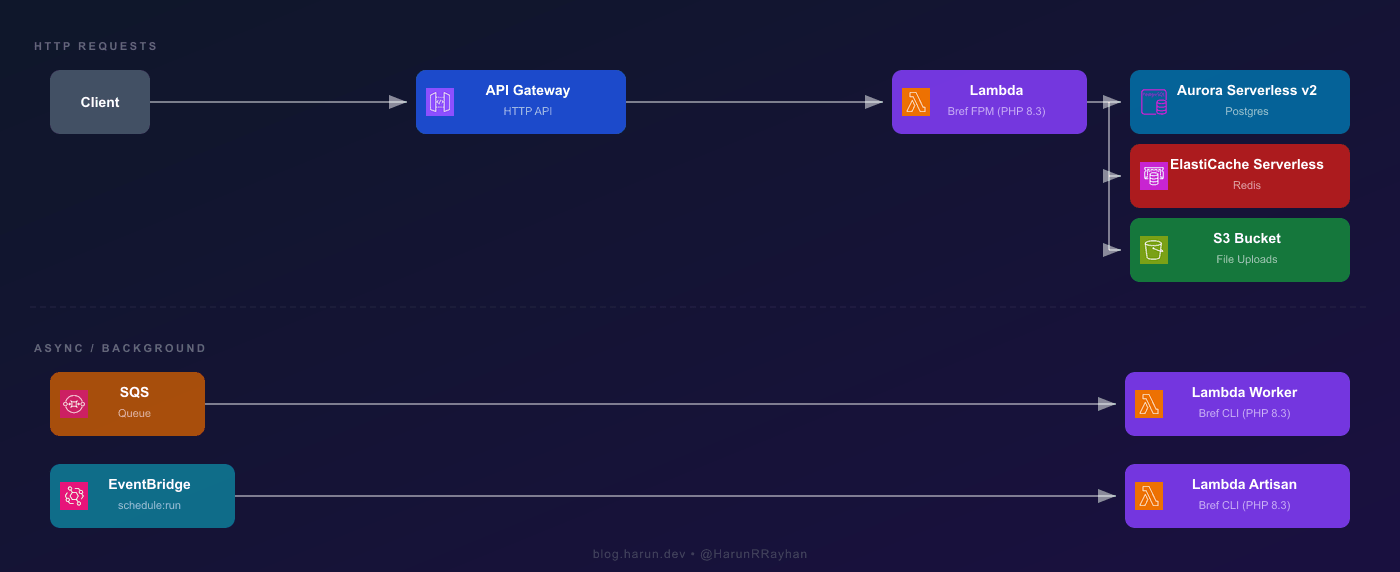
Three Lambda functions total. The web Lambda handles HTTP via the Bref FPM runtime (php-83-fpm), which boots PHP-FPM and proxies API Gateway events to it. Your Laravel app thinks it's running behind Nginx. The worker Lambda processes SQS jobs, and the artisan Lambda fires schedule:run every minute via EventBridge. Both use the Bref CLI runtime (php-83), no FPM overhead.
Aurora Serverless v2 scales Postgres capacity in ACUs based on actual load. No instance sizing, no patching, Multi-AZ by default. If you'd rather skip VPC networking entirely, Supabase and Neon both work as drop-in Postgres replacements accessible over the public internet. For this post we're staying full AWS.
ElastiCache Serverless gives you pay-per-use Redis with zero cluster management. Laravel needs it for sessions and cache because Lambda's filesystem is ephemeral between cold starts. Both Aurora and ElastiCache live inside a VPC, so your Lambda functions need to be there too.
 Photo by Brett Sayles on Pexels
Setting Up Laravel + Bref
First, pull in the Bref packages:
composer require bref/bref bref/laravel-bridge
php artisan vendor:publish --tag=serverless-config
The bref/laravel-bridge package does the heavy lifting: it bootstraps Laravel for Lambda, handles FPM event conversion, and provides Artisan handlers for queue and CLI invocations. After publishing you'll get a serverless.php entrypoint in your project root.
Lambda doesn't have a .env file on disk. You pass environment variables through the Lambda function config. Here's what needs to change from a typical server setup:
SESSION_DRIVER=cookie
CACHE_STORE=redis
FILESYSTEM_DISK=s3
LOG_CHANNEL=stderr
QUEUE_CONNECTION=sqs
VIEW_COMPILED_PATH=/tmp/views
Cookie sessions are stateless and the simplest starting point. Upgrade to Redis sessions if your session data outgrows the 4KB cookie limit. Redis cache is mandatory because Lambda's filesystem doesn't persist across cold starts. Stderr logging goes straight to CloudWatch. And /tmp/views is the only writable path for compiled Blade templates. Any temp files your app writes (uploads, exports) should also target /tmp before being pushed to S3.
Aurora Serverless v2 + ElastiCache Serverless
Let's talk about the database and cache layers before we get into Terraform, because understanding these services makes the infrastructure code much easier to follow.
Aurora Serverless v2 scales Postgres capacity in ACUs instead of fixing an instance size. You set a minimum (I use 0.5) and a maximum (4 to 8 for most Laravel apps), and Aurora adjusts within that range based on load. Billing is per ACU-hour, roughly $0.12 in us-east-1. It's real Aurora under the hood: same replication, same query optimizer, Multi-AZ by default.
From Laravel's side, the connection config is standard Postgres:
DB_CONNECTION=pgsql
DB_HOST=hrr-laravel-db.cluster-xxxxxxxxxxxx.us-east-1.rds.amazonaws.com
DB_PORT=5432
DB_DATABASE=hrr_laravel
DB_USERNAME=hrr_admin
DB_PASSWORD=<from-secrets-manager>
If you'd rather avoid VPC networking for the database, Supabase and Neon are both solid alternatives. They're publicly accessible Postgres, so you just swap the host and skip the NAT Gateway entirely. For this guide we're going full AWS.
ElastiCache Serverless is pay-per-use Redis with no node type or replication group to manage. Bref's PHP layer includes phpredis, so no extra setup needed.
REDIS_HOST=hrr-laravel-cache-xxxxxx.serverless.use1.cache.amazonaws.com
REDIS_PORT=6379
Both services require VPC placement, so your Lambda functions need to be in the same VPC. If your app calls external APIs (Stripe, Mailgun, etc.), you'll need a NAT Gateway in a public subnet. That runs about $32 per month and is often the biggest fixed cost in what's supposed to be a "serverless" setup.
Terraform Infrastructure
Time for the fun part. The full Terraform config is around 300 lines, so I'll walk through the key blocks and explain what connects to what.
VPC and Subnets
We need a VPC with both public and private subnets. Lambda, Aurora, and ElastiCache go in private subnets. The NAT Gateway sits in a public subnet so Lambda can reach the internet.
resource "aws_vpc" "hrr_laravel_vpc" {
  cidr_block           = "10.0.0.0/16"
  enable_dns_support   = true
  enable_dns_hostnames = true

  tags = { Name = "hrr-laravel-vpc" }
}

resource "aws_subnet" "hrr_private_a" {
  vpc_id            = aws_vpc.hrr_laravel_vpc.id
  cidr_block        = "10.0.1.0/24"
  availability_zone = "${var.aws_region}a"
  tags = { Name = "hrr-laravel-private-a" }
}

resource "aws_subnet" "hrr_private_b" {
  vpc_id            = aws_vpc.hrr_laravel_vpc.id
  cidr_block        = "10.0.2.0/24"
  availability_zone = "${var.aws_region}b"
  tags = { Name = "hrr-laravel-private-b" }
}

resource "aws_subnet" "hrr_public" {
  vpc_id                  = aws_vpc.hrr_laravel_vpc.id
  cidr_block              = "10.0.3.0/24"
  availability_zone       = "${var.aws_region}a"
  map_public_ip_on_launch = true
  tags = { Name = "hrr-laravel-public" }
}
Two private subnets in different AZs because Aurora requires at least two. One public subnet for the NAT Gateway and Internet Gateway.
Aurora Serverless v2
This part tripped me up the first time. Aurora Serverless v2 doesn't use the old engine_mode = "serverless". That was v1. For v2, you set engine_mode = "provisioned" and add a serverlessv2_scaling_configuration block. Confusing naming, I know.
resource "aws_rds_cluster" "hrr_laravel_db" {
  cluster_identifier     = "hrr-laravel-db"
  engine                 = "aurora-postgresql"
  engine_mode            = "provisioned"
  engine_version         = "16.4"
  database_name          = "hrr_laravel"
  master_username        = "hrr_admin"
  master_password        = var.db_password
  db_subnet_group_name   = aws_db_subnet_group.hrr_laravel.name
  vpc_security_group_ids = [aws_security_group.hrr_db_sg.id]
  skip_final_snapshot    = true

  serverlessv2_scaling_configuration {
    min_capacity = 0.5
    max_capacity = 4.0
  }

  tags = { Name = "hrr-laravel-db" }
}

resource "aws_rds_cluster_instance" "hrr_laravel_db_instance" {
  cluster_identifier = aws_rds_cluster.hrr_laravel_db.id
  instance_class     = "db.serverless"
  engine             = aws_rds_cluster.hrr_laravel_db.engine
  engine_version     = aws_rds_cluster.hrr_laravel_db.engine_version

  tags = { Name = "hrr-laravel-db-instance" }
}

resource "aws_db_subnet_group" "hrr_laravel" {
  name       = "hrr-laravel-db-subnet"
  subnet_ids = [
    aws_subnet.hrr_private_a.id,
    aws_subnet.hrr_private_b.id,
  ]
}
The key is instance_class = "db.serverless". That tells Aurora to use serverless v2 scaling on this instance. The cluster-level serverlessv2_scaling_configuration sets the ACU range.
ElastiCache Serverless
resource "aws_elasticache_serverless_cache" "hrr_laravel_cache" {
  engine = "redis"
  name   = "hrr-laravel-cache"

  cache_usage_limits {
    data_storage {
      maximum = 1
      unit    = "GB"
    }
    ecpu_per_second {
      maximum = 1000
    }
  }

  subnet_ids         = [
    aws_subnet.hrr_private_a.id,
    aws_subnet.hrr_private_b.id,
  ]
  security_group_ids = [aws_security_group.hrr_cache_sg.id]
}
ElastiCache Serverless is beautifully simple compared to the old way. No replication groups, no node types, no parameter groups. You set usage limits and AWS handles everything else.
Lambda Function (Bref FPM)
resource "aws_lambda_function" "hrr_laravel_web" {
  function_name = "hrr_laravel_web"
  runtime       = "provided.al2023"
  architectures = ["arm64"]
  handler       = "Bref\\LaravelBridge\\Http\\OctaneHandler"
  memory_size   = 1024
  timeout       = 28

  filename         = "${path.module}/dist/app.zip"
  source_code_hash = filebase64sha256("${path.module}/dist/app.zip")

  layers = [
    "arn:aws:lambda:${var.aws_region}:534081306603:layer:php-83-fpm:68",
  ]

  vpc_config {
    subnet_ids         = [
      aws_subnet.hrr_private_a.id,
      aws_subnet.hrr_private_b.id,
    ]
    security_group_ids = [aws_security_group.hrr_lambda_sg.id]
  }

  environment {
    variables = {
      APP_ENV            = "production"
      APP_KEY            = var.app_key
      DB_CONNECTION      = "pgsql"
      DB_HOST            = aws_rds_cluster.hrr_laravel_db.endpoint
      DB_PORT            = "5432"
      DB_DATABASE        = "hrr_laravel"
      DB_USERNAME        = "hrr_admin"
      DB_PASSWORD        = var.db_password
      REDIS_HOST         = aws_elasticache_serverless_cache.hrr_laravel_cache.endpoint[0].address
      REDIS_PORT         = "6379"
      CACHE_STORE        = "redis"
      SESSION_DRIVER     = "cookie"
      LOG_CHANNEL        = "stderr"
      QUEUE_CONNECTION   = "sqs"
      SQS_QUEUE          = aws_sqs_queue.hrr_laravel_queue.url
      FILESYSTEM_DISK    = "s3"
      AWS_BUCKET         = aws_s3_bucket.hrr_laravel_uploads.id
    }
  }

  tags = { Name = "hrr-laravel-web" }
}
A few things to note. The runtime is provided.al2023, not php83 or anything like that. Bref provides the PHP runtime as a Lambda layer. The handler points to Bref's Laravel bridge, which bootstraps your application and converts API Gateway events into HTTP requests that FPM can process.
I set memory_size to 1024MB. Lambda allocates CPU proportionally to memory, so 1024MB gives you a decent amount of compute. The timeout is 28 seconds because API Gateway HTTP API has a 29-second hard limit. You want Lambda to finish before the gateway times out, otherwise you get a 502 with no useful error message. I learned this one by debugging a 502 for about 45 minutes before realizing the Lambda was timing out at 30 seconds, one second after API Gateway gave up.
Using arm64 (Graviton) gives you about 20% better price-performance than x86. Bref supports both architectures.
API Gateway HTTP API
resource "aws_apigatewayv2_api" "hrr_laravel_api" {
  name          = "hrr-laravel-api"
  protocol_type = "HTTP"
}

resource "aws_apigatewayv2_integration" "hrr_laravel_integration" {
  api_id                 = aws_apigatewayv2_api.hrr_laravel_api.id
  integration_type       = "AWS_PROXY"
  integration_uri        = aws_lambda_function.hrr_laravel_web.invoke_arn
  payload_format_version = "2.0"
}

resource "aws_apigatewayv2_route" "hrr_laravel_default" {
  api_id    = aws_apigatewayv2_api.hrr_laravel_api.id
  route_key = "\$default"
  target    = "integrations/${aws_apigatewayv2_integration.hrr_laravel_integration.id}"
}

resource "aws_apigatewayv2_stage" "hrr_laravel_stage" {
  api_id      = aws_apigatewayv2_api.hrr_laravel_api.id
  name        = "\$default"
  auto_deploy = true
}

resource "aws_lambda_permission" "hrr_laravel_apigw" {
  statement_id  = "AllowAPIGateway"
  action        = "lambda:InvokeFunction"
  function_name = aws_lambda_function.hrr_laravel_web.function_name
  principal     = "apigateway.amazonaws.com"
  source_arn    = "${aws_apigatewayv2_api.hrr_laravel_api.execution_arn}/*/*"
}
The $default route catches everything and sends it to Lambda. Laravel's router handles the actual URL matching, so we don't need to define API Gateway routes for every endpoint. The payload_format_version = "2.0" is important because Bref expects the v2 event format.
S3 Bucket and IAM
resource "aws_s3_bucket" "hrr_laravel_uploads" {
  bucket = "hrr-laravel-uploads-${var.aws_account_id}"
  tags   = { Name = "hrr-laravel-uploads" }
}

resource "aws_iam_role" "hrr_laravel_lambda_role" {
  name = "hrr-laravel-lambda-role"

  assume_role_policy = jsonencode({
    Version = "2012-10-17"
    Statement = [{
      Action = "sts:AssumeRole"
      Effect = "Allow"
      Principal = { Service = "lambda.amazonaws.com" }
    }]
  })
}

resource "aws_iam_role_policy_attachment" "hrr_lambda_vpc" {
  role       = aws_iam_role.hrr_laravel_lambda_role.name
  policy_arn = "arn:aws:iam::aws:policy/service-role/AWSLambdaVPCAccessExecutionRole"
}

resource "aws_iam_policy" "hrr_laravel_app_policy" {
  name = "hrr-laravel-app-policy"
  policy = jsonencode({
    Version = "2012-10-17"
    Statement = [
      {
        Effect   = "Allow"
        Action   = ["s3:PutObject", "s3:GetObject", "s3:DeleteObject"]
        Resource = "${aws_s3_bucket.hrr_laravel_uploads.arn}/*"
      },
      {
        Effect   = "Allow"
        Action   = ["sqs:SendMessage", "sqs:ReceiveMessage", "sqs:DeleteMessage", "sqs:GetQueueAttributes"]
        Resource = aws_sqs_queue.hrr_laravel_queue.arn
      },
      {
        Effect   = "Allow"
        Action   = ["secretsmanager:GetSecretValue"]
        Resource = "*"
      }
    ]
  })
}

resource "aws_iam_role_policy_attachment" "hrr_laravel_app" {
  role       = aws_iam_role.hrr_laravel_lambda_role.name
  policy_arn = aws_iam_policy.hrr_laravel_app_policy.arn
}
The IAM role gives Lambda permission to run inside the VPC, access S3 for uploads, send and receive SQS messages, and pull secrets from Secrets Manager. In production, you'd scope the Secrets Manager resource down to specific secret ARNs instead of using a wildcard.
 Photo by Godfrey Atima on Pexels
SQS Queues and EventBridge Cron
Laravel's queue system on Lambda works differently than on a traditional server. Normally you'd run php artisan queue:work as a long-running process. On Lambda, that's not possible. Instead, SQS triggers a Lambda function for each message, and Bref's queue handler processes it as a single job invocation.
SQS Queue and Dead Letter Queue
resource "aws_sqs_queue" "hrr_laravel_dlq" {
  name                      = "hrr_laravel_dlq"
  message_retention_seconds = 1209600

  tags = { Name = "hrr-laravel-dlq" }
}

resource "aws_sqs_queue" "hrr_laravel_queue" {
  name                       = "hrr_laravel_queue"
  visibility_timeout_seconds = 120
  message_retention_seconds  = 1209600

  redrive_policy = jsonencode({
    deadLetterTargetArn = aws_sqs_queue.hrr_laravel_dlq.arn
    maxReceiveCount     = 3
  })

  tags = { Name = "hrr-laravel-queue" }
}
The visibility timeout is set to 120 seconds, which is about twice the Lambda timeout. If a job fails and Lambda doesn't delete the message, SQS waits 120 seconds before making it visible again for retry. After 3 failed attempts, the message moves to the DLQ where it sits for 14 days.
Queue Worker Lambda
resource "aws_lambda_function" "hrr_laravel_worker" {
  function_name = "hrr_laravel_worker"
  runtime       = "provided.al2023"
  architectures = ["arm64"]
  handler       = "Bref\\LaravelBridge\\Queue\\QueueHandler"
  memory_size   = 1024
  timeout       = 60
  role          = aws_iam_role.hrr_laravel_lambda_role.arn

  filename         = "${path.module}/dist/app.zip"
  source_code_hash = filebase64sha256("${path.module}/dist/app.zip")

  layers = [
    "arn:aws:lambda:${var.aws_region}:534081306603:layer:php-83:68",
  ]

  vpc_config {
    subnet_ids         = [
      aws_subnet.hrr_private_a.id,
      aws_subnet.hrr_private_b.id,
    ]
    security_group_ids = [aws_security_group.hrr_lambda_sg.id]
  }

  environment {
    variables = {
      APP_ENV          = "production"
      APP_KEY          = var.app_key
      DB_CONNECTION    = "pgsql"
      DB_HOST          = aws_rds_cluster.hrr_laravel_db.endpoint
      DB_PORT          = "5432"
      DB_DATABASE      = "hrr_laravel"
      DB_USERNAME      = "hrr_admin"
      DB_PASSWORD      = var.db_password
      REDIS_HOST       = aws_elasticache_serverless_cache.hrr_laravel_cache.endpoint[0].address
      REDIS_PORT       = "6379"
      CACHE_STORE      = "redis"
      LOG_CHANNEL      = "stderr"
      QUEUE_CONNECTION = "sqs"
      SQS_QUEUE        = aws_sqs_queue.hrr_laravel_queue.url
    }
  }

  tags = { Name = "hrr-laravel-worker" }
}

resource "aws_lambda_event_source_mapping" "hrr_laravel_sqs_trigger" {
  event_source_arn = aws_sqs_queue.hrr_laravel_queue.arn
  function_name    = aws_lambda_function.hrr_laravel_worker.arn
  batch_size       = 1

  function_response_types = ["ReportBatchItemFailures"]
}
Notice this Lambda uses the php-83 layer, not php-83-fpm. Queue workers don't need FPM because there's no HTTP request to process. The handler Bref\LaravelBridge\Queue\QueueHandler knows how to deserialize SQS messages back into Laravel job objects. Your job classes work exactly like they would on a normal server. You dispatch jobs the same way too. dispatch(new ProcessPodcast($podcast)) sends a message to SQS, and the worker Lambda picks it up.
EventBridge Cron for Artisan Schedule
resource "aws_lambda_function" "hrr_laravel_artisan" {
  function_name = "hrr_laravel_artisan"
  runtime       = "provided.al2023"
  architectures = ["arm64"]
  handler       = "artisan"
  memory_size   = 512
  timeout       = 120
  role          = aws_iam_role.hrr_laravel_lambda_role.arn

  filename         = "${path.module}/dist/app.zip"
  source_code_hash = filebase64sha256("${path.module}/dist/app.zip")

  layers = [
    "arn:aws:lambda:${var.aws_region}:534081306603:layer:php-83:68",
    "arn:aws:lambda:${var.aws_region}:534081306603:layer:console:68",
  ]

  vpc_config {
    subnet_ids         = [
      aws_subnet.hrr_private_a.id,
      aws_subnet.hrr_private_b.id,
    ]
    security_group_ids = [aws_security_group.hrr_lambda_sg.id]
  }

  environment {
    variables = {
      APP_ENV          = "production"
      APP_KEY          = var.app_key
      DB_CONNECTION    = "pgsql"
      DB_HOST          = aws_rds_cluster.hrr_laravel_db.endpoint
      DB_PORT          = "5432"
      DB_DATABASE      = "hrr_laravel"
      DB_USERNAME      = "hrr_admin"
      DB_PASSWORD      = var.db_password
      REDIS_HOST       = aws_elasticache_serverless_cache.hrr_laravel_cache.endpoint[0].address
      REDIS_PORT       = "6379"
      CACHE_STORE      = "redis"
      LOG_CHANNEL      = "stderr"
    }
  }

  tags = { Name = "hrr-laravel-artisan" }
}

resource "aws_cloudwatch_event_rule" "hrr_laravel_cron" {
  name                = "hrr-laravel-cron"
  schedule_expression = "rate(1 minute)"

  tags = { Name = "hrr-laravel-cron" }
}

resource "aws_cloudwatch_event_target" "hrr_laravel_cron_target" {
  rule = aws_cloudwatch_event_rule.hrr_laravel_cron.name
  arn  = aws_lambda_function.hrr_laravel_artisan.arn

  input = jsonencode({
    cli = "schedule:run"
  })
}

resource "aws_lambda_permission" "hrr_laravel_eventbridge" {
  statement_id  = "AllowEventBridge"
  action        = "lambda:InvokeFunction"
  function_name = aws_lambda_function.hrr_laravel_artisan.function_name
  principal     = "events.amazonaws.com"
  source_arn    = aws_cloudwatch_event_rule.hrr_laravel_cron.arn
}
EventBridge fires every minute, just like a normal cron. The input payload tells Bref's console layer to run php artisan schedule:run. Laravel's scheduler then checks which commands are due and executes them. This is the exact same behavior as having * * * * * cd /path && php artisan schedule:run >> /dev/null 2>&1 in your crontab on a server.
I also use this artisan Lambda for ad-hoc commands. Need to run migrations? Invoke it with {"cli": "migrate --force"}. Need to clear cache? {"cli": "cache:clear"}. Really handy during deployments.
Deploy, Test, and Iterate
With all the Terraform written, let's actually ship this thing.
Build the Deployment Package
Before running Terraform, you need to package your Laravel app into a zip. This zip gets uploaded as the Lambda function code. Here's how I do it:
# Install production dependencies
composer install --no-dev --optimize-autoloader --classmap-authoritative

# Optimize Laravel
php artisan config:cache
php artisan route:cache
php artisan view:cache
php artisan event:cache

# Package everything into a zip
zip -r dist/app.zip . \
  -x ".git/*" \
  -x "node_modules/*" \
  -x "tests/*" \
  -x "storage/logs/*" \
  -x ".env"
The --classmap-authoritative flag skips PSR-4 autoloading for faster cold starts, and caching config, routes, and views cuts down the work Laravel does on each request. Both matter more on Lambda than on a server.
Run Terraform
terraform init
terraform plan
The plan output is going to be long. You're creating a VPC, subnets, security groups, Aurora cluster, ElastiCache cache, three Lambda functions, API Gateway, SQS queues, EventBridge rules, IAM roles, and a bunch of supporting resources. Around 30 to 40 resources total. Scan through the plan to make sure nothing looks wrong.
terraform apply
Type yes and go grab a coffee. The Aurora cluster alone takes 5 to 10 minutes to provision. ElastiCache Serverless is usually faster, about 2 to 3 minutes. The rest finishes in under a minute each. Total time from apply to everything being live is roughly 10 to 15 minutes.
Run Migrations
Once apply completes, run your database migrations through the artisan Lambda:
aws lambda invoke \
  --function-name hrr_laravel_artisan \
  --payload '{"cli": "migrate --force"}' \
  --cli-binary-format raw-in-base64-out \
  output.json

cat output.json
You should see the familiar migration output. If the Lambda can't reach Aurora, you'll get a connection timeout error, which means your VPC security groups or subnet configuration needs debugging. Double check that the Lambda security group allows outbound traffic to the database security group on port 5432.
Hit the Endpoint
Terraform should output your API Gateway URL. Something like https://abc123def.execute-api.us-east-1.amazonaws.com.
curl https://abc123def.execute-api.us-east-1.amazonaws.com
I still remember the first time I saw the Laravel welcome page come back from a curl to a Lambda URL. Took me a second to process that there was no server running anywhere. No EC2, no container, no process manager. Just PHP running inside Lambda's microVM for the duration of a single request and then disappearing. Pretty wild.
CI/CD
For ongoing deployments, I keep it simple with GitHub Actions. The workflow looks roughly like this: checkout code, run composer install --no-dev, cache routes and config, zip the app, run terraform apply with -auto-approve, then invoke the artisan Lambda to run migrations. You store your AWS credentials and Terraform state backend config as GitHub secrets.
The full CI/CD setup is its own topic. Running the commands manually is fine to start.
Cost Breakdown and Wrapping Up
Let's put real numbers on three ways to run this app. Roughly 100,000 requests per month, a handful of background jobs, standard session and cache usage.
If you read my earlier Terraform post about deploying Laravel on EC2, that setup uses a t3.medium at about \(30 per month just for the instance. Then you tack on RDS for Postgres at \)15 to \(25 depending on the size, plus ElastiCache for Redis at \)12 to \(15. So you land somewhere in the \)57 to $70 range. The thing that always bugged me about that approach is you're paying the same amount whether your app is handling traffic or sitting idle at 3am on a Tuesday. And if you suddenly get a spike, you're either overprovisioned already (wasting money the rest of the time) or scrambling to bolt on auto-scaling after things start falling over.
Now, Laravel Vapor is interesting because it genuinely is convenient. The subscription runs \(399 per year, so about \)33 per month before AWS charges even enter the picture. On top of that you're still paying for Lambda, RDS, ElastiCache, and all the usual AWS stuff at normal rates. For our 100K request scenario the AWS portion might run \(15 to \)25, which puts your total around \(48 to \)58 per month. I actually considered Vapor for a while. It's well-integrated with Laravel and the deployment experience is smooth. But I kept coming back to the fact that I was paying a monthly premium for something I could wire up myself with Terraform and a weekend of focused work.
So what does this Bref and Terraform setup actually cost? There's no subscription, which is already a win. Lambda's free tier covers 1 million requests and 400,000 GB-seconds per month. Our 100K requests barely registers. Even past the free tier, Lambda pricing for this kind of workload comes out to roughly \(2 to \)5 per month. The biggest line item is Aurora Serverless v2. At 0.5 ACUs minimum, you're looking at about \(43 per month at the floor. I'll be honest, that one stung a little when I first saw the bill. If you swapped Aurora for Neon or Supabase's free tier, you could cut that to nearly zero for low-traffic apps. ElastiCache Serverless for light cache and session usage runs about \)3 to \(5 per month. Then there's the NAT Gateway, the one that catches people off guard at roughly \)32 per month. API Gateway HTTP API at 100K requests is under \(1, and S3 plus SQS are negligible. All together with Aurora and the NAT Gateway, you're at \)80 to \(85 per month. But if your app doesn't need to call external APIs from Lambda, you can ditch the NAT Gateway. Pair that with a third-party Postgres provider and you drop to \)10 to $15 per month. The real advantage shows up as traffic grows, because you're only paying for what you use instead of keeping idle capacity warm.
So which one should you pick? Honestly, it depends. I went with Bref and Terraform because I wanted full control and didn't mind spending time on infrastructure. If that sounds like too much hassle and you'd rather just vapor deploy and move on, Vapor is perfectly fine for that. And funny enough, if your traffic is steady and predictable, a plain EC2 instance might actually work out cheaper than any of the serverless options. There's no universal answer here.
This is Part 1 of my Serverless Laravel series. In Part 2, I'll cover running Laravel on Fargate and App Runner for workloads that don't fit Lambda's constraints. Think long-running processes, WebSocket connections, or apps that need more than 10GB of ephemeral storage. Different tools for different problems.
Hope you enjoyed this one. If you're running Laravel on Lambda or thinking about making the switch, I'd love to hear how it's going. Drop me a message on Twitter/X and let's chat about it.
On this post
Comments
A reply stays under the note it answers.
No comments yet.
If you have a note on Serverless Laravel on AWS Lambda with Bref and Terraform, sign in and leave it.