App Runner vs ECS Fargate for Laravel
Updated September 30, 2026: AWS App Runner is closed to new customers. Existing customers can still use it and create services, but AWS isn't planning new features. See the AWS App Runner availability guidance before choosing it for a project.
- New Laravel deployment: use ECS Fargate. If you want a simpler web deployment, consider ECS Express Mode, which provisions the Fargate service, load balancer and scaling resources. You still pay for those resources. The Terraform example below configures ECS directly; it isn't an Express Mode walkthrough.
- Long-running queue jobs: use a separate Fargate worker service running
php artisan queue:work, as shown below. Choose the web tier separately from the worker tier.
- Existing App Runner customer: the App Runner example remains useful for an HTTP web tier. Keep background workers in a separate service.
When Lambda Isn't Enough
In Part 1 of this series I walked through deploying Laravel to AWS Lambda with Bref and Terraform. That setup covers most of what Laravel apps actually need. API endpoints, web pages, background jobs, scheduled commands. Lambda handles all of it well.
Then I hit a problem I couldn't engineer my way around. I was building a video processing feature where users uploaded files to S3, a queue job picked them up, ran FFmpeg for transcoding, and pushed results back. Simple enough in theory. But some of those jobs took 25 to 40 minutes depending on file size, and Lambda caps out at 15 minutes. I tried breaking the work into smaller chunks and passing state between invocations. It sort of worked, but the serialization overhead made everything fragile. The code was ugly too, if I'm being honest. That's when containers started looking really appealing.
Lambda does have a 15-minute hard cap on execution time, and that's not something you can architect around. If you're processing large files, running long ML jobs, or doing anything time-intensive in a queue worker, it just won't work. WebSocket connections are awkward too, because the Lambda handling your connection restarts every 15 minutes whether you like it or not. I also bumped into the ephemeral storage limit once when I was doing image batch processing and didn't realize how fast /tmp fills up.
If you've been following this series, you'll recognize some of the pieces here. The EC2 approach from an earlier post solved the runtime problem the old-fashioned way. The Serverless SaaS architecture I built with Fastify went the opposite direction. Containers sit in between. ECS Fargate gives you container control without any EC2 instances to babysit, and App Runner goes even further by hiding most of the infrastructure entirely. Let's dig into both.
 Photo by David Dibert on Pexels
Architecture Overview
Here's what we're building:
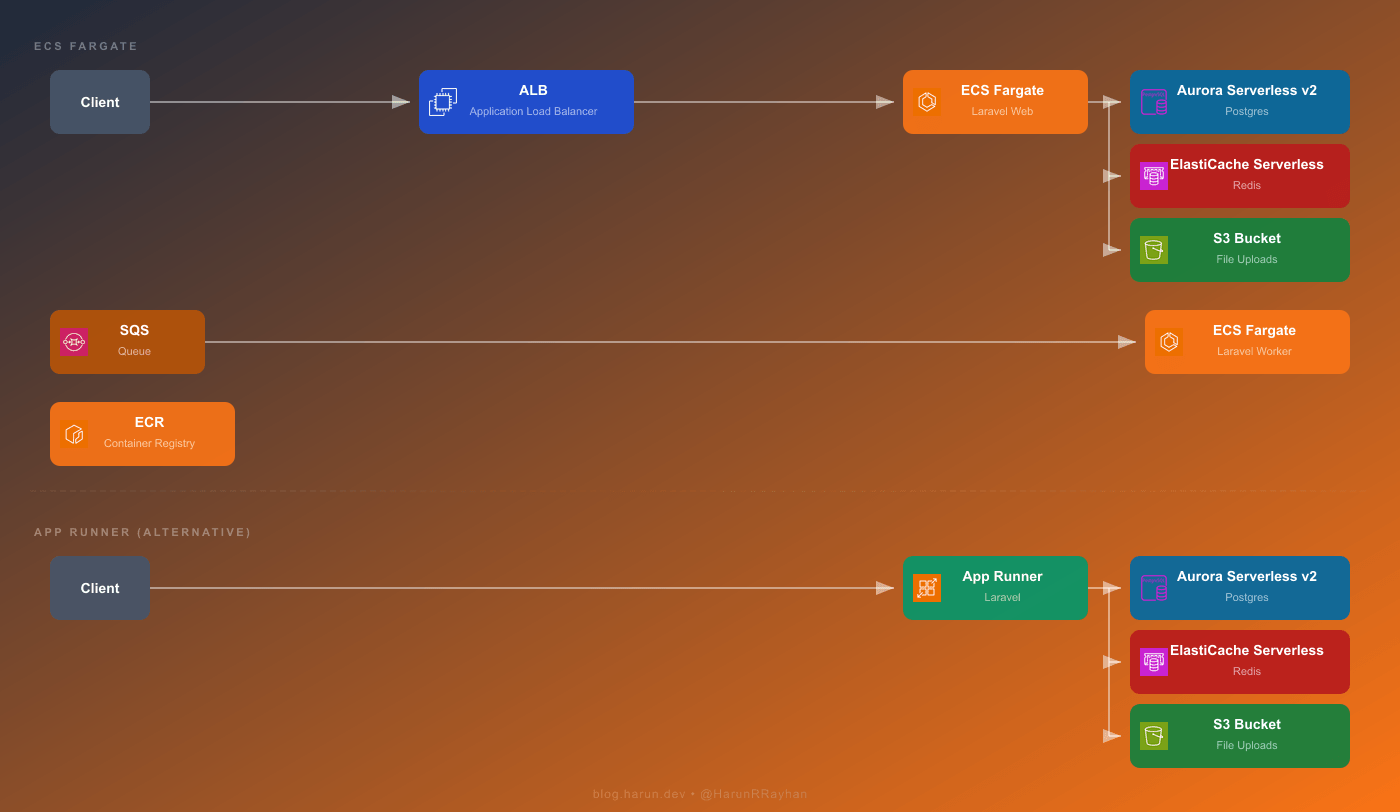
Two paths are shown in that diagram. You'd choose one based on what your app actually needs.
The Fargate path is the full-featured option. Requests hit an Application Load Balancer first, which forwards traffic to ECS Fargate tasks running your Laravel app inside a Docker container. Those tasks talk to Aurora Serverless v2 for Postgres, ElastiCache Serverless for Redis, and S3 for file storage. Background processing works through SQS, which feeds messages to a separate group of Fargate tasks running php artisan queue:work. Both the web tasks and the worker tasks pull their container image from ECR.
The App Runner path is dramatically simpler. Client requests go straight to App Runner, which takes care of load balancing, TLS termination, and auto-scaling on your behalf. It's still running your container underneath, but you never touch the networking layer yourself. App Runner talks to the same backend services: Aurora, ElastiCache, and S3.
Both paths use the exact same Docker image. Build once, push to ECR, and either service can run it. That portability is honestly one of the best parts of going containers.
The real question is how much infrastructure you want to own. Fargate gives you networking control, custom auto-scaling, and SQS-driven workers, but you're writing a lot more Terraform. App Runner removes almost all of that. I've used it for internal tools where I just wanted something live in 10 minutes without thinking about ALBs or target groups. For production workloads with queue workers and strict networking requirements, Fargate wins.
Dockerizing Laravel
Before either Fargate or App Runner can do anything useful, we need a production-ready Docker image. I go with a multi-stage build so the final image stays small and doesn't ship dev dependencies or build tooling.
# Stage 1: Composer dependencies
FROM composer:2 AS vendor
WORKDIR /app
COPY composer.json composer.lock ./
RUN composer install --no-dev --optimize-autoloader --classmap-authoritative --no-scripts

# Stage 2: Node/frontend assets
FROM node:20-alpine AS assets
WORKDIR /app
COPY package.json package-lock.json ./
RUN npm ci
COPY . .
RUN npm run build

# Stage 3: Production image
FROM php:8.3-fpm-alpine AS production

RUN apk add --no-cache nginx supervisor curl \
    && docker-php-ext-install pdo pdo_pgsql opcache

RUN apk add --no-cache autoconf g++ make \
    && pecl install redis \
    && docker-php-ext-enable redis \
    && apk del autoconf g++ make

WORKDIR /var/www/html

COPY --from=vendor /app/vendor ./vendor
COPY --from=assets /app/public/build ./public/build
COPY . .

COPY docker/nginx.conf /etc/nginx/nginx.conf
COPY docker/supervisord.conf /etc/supervisor/conf.d/supervisord.conf
COPY docker/php.ini /usr/local/etc/php/conf.d/custom.ini

RUN php artisan config:cache \
    && php artisan route:cache \
    && php artisan view:cache \
    && php artisan event:cache

EXPOSE 80
CMD ["/usr/bin/supervisord", "-c", "/etc/supervisor/conf.d/supervisord.conf"]
The first stage installs Composer dependencies in its own isolated layer. Second stage handles frontend asset compilation through Vite or Mix. The third stage is your actual runtime, built on Alpine to keep things lean. Supervisor runs both Nginx and PHP-FPM inside the container. That's pretty much the standard approach for Laravel in a single container, and it works well.
You'll also want a .dockerignore so unnecessary files don't bloat the build context:
.git
.env
node_modules
storage/logs
tests
docker-compose.yml
Next up, push the image to ECR. Create the repository if it doesn't exist yet, authenticate, and push:
# Authenticate Docker to ECR
aws ecr get-login-password --region us-east-1 | \
  docker login --username AWS --password-stdin \
  123456789012.dkr.ecr.us-east-1.amazonaws.com

# Build and tag
docker build -t hrr-laravel-app:latest .
docker tag hrr-laravel-app:latest \
  123456789012.dkr.ecr.us-east-1.amazonaws.com/hrr-laravel-app:latest

# Push
docker push 123456789012.dkr.ecr.us-east-1.amazonaws.com/hrr-laravel-app:latest
Heads up though. Your first build will probably take 5 to 8 minutes because it needs to download base images and compile PHP extensions from scratch. Once that's done, Docker's layer cache makes subsequent builds finish in under a minute, assuming you haven't changed your Composer or npm dependencies. Also, and I cannot stress this enough, do not bake your .env file into the Docker image. Environment variables belong in ECS task definitions or App Runner runtime config. I learned this the hard way on a staging environment. Spent way too long trying to figure out why production secrets were leaking into staging logs before I realized the .env was sitting right there in the image.
ECS Fargate with Terraform
Now for the big chunk. We need an ECR repository, an ECS cluster, a task definition, an ALB, and a service that wires everything together. I'll go through each piece.
ECR Repository
resource "aws_ecr_repository" "hrr_laravel_ecr" {
  name         = "hrr-laravel-app"
  force_delete = true

  image_scanning_configuration {
    scan_on_push = true
  }

  tags = { Name = "hrr-laravel-ecr" }
}
Setting force_delete = true lets Terraform tear down the repo even when it still has images in it. Handy while you're iterating, though you probably want to pull that flag in production.
CloudWatch Logs and ECS Cluster
resource "aws_cloudwatch_log_group" "hrr_laravel_logs" {
  name              = "/ecs/hrr-laravel-web"
  retention_in_days = 7

  tags = { Name = "hrr-laravel-logs" }
}

resource "aws_ecs_cluster" "hrr_laravel_cluster" {
  name = "hrr-laravel-cluster"

  setting {
    name  = "containerInsights"
    value = "enabled"
  }

  tags = { Name = "hrr-laravel-cluster" }
}
Seven days of log retention is fine for development and keeps costs low. For production you'd bump that to 30 or 90. Container Insights gets you CPU and memory metrics without any extra setup.
Task Definition
This is where the real complexity lives:
resource "aws_ecs_task_definition" "hrr_laravel_web_task" {
  family                   = "hrr-laravel-web"
  network_mode             = "awsvpc"
  requires_compatibilities = ["FARGATE"]
  cpu                      = "512"
  memory                   = "1024"
  execution_role_arn       = aws_iam_role.hrr_ecs_execution_role.arn
  task_role_arn            = aws_iam_role.hrr_ecs_task_role.arn

  runtime_platform {
    operating_system_family = "LINUX"
    cpu_architecture        = "ARM64"
  }

  container_definitions = jsonencode([
    {
      name      = "hrr-laravel-web"
      image     = "${aws_ecr_repository.hrr_laravel_ecr.repository_url}:latest"
      essential = true

      portMappings = [
        {
          containerPort = 80
          protocol      = "tcp"
        }
      ]

      healthCheck = {
        command     = ["CMD-SHELL", "curl -f http://localhost/health || exit 1"]
        interval    = 30
        timeout     = 5
        retries     = 3
        startPeriod = 60
      }

      environment = [
        { name = "APP_ENV",          value = "production" },
        { name = "APP_KEY",          value = var.app_key },
        { name = "DB_CONNECTION",    value = "pgsql" },
        { name = "DB_HOST",          value = aws_rds_cluster.hrr_laravel_db.endpoint },
        { name = "DB_PORT",          value = "5432" },
        { name = "DB_DATABASE",      value = "hrr_laravel" },
        { name = "DB_USERNAME",      value = "hrr_admin" },
        { name = "DB_PASSWORD",      value = var.db_password },
        { name = "REDIS_HOST",       value = aws_elasticache_serverless_cache.hrr_laravel_cache.endpoint[0].address },
        { name = "REDIS_PORT",       value = "6379" },
        { name = "CACHE_STORE",      value = "redis" },
        { name = "SESSION_DRIVER",   value = "redis" },
        { name = "LOG_CHANNEL",      value = "stderr" },
        { name = "QUEUE_CONNECTION", value = "sqs" },
        { name = "SQS_QUEUE",       value = aws_sqs_queue.hrr_laravel_queue.url },
        { name = "FILESYSTEM_DISK", value = "s3" },
        { name = "AWS_BUCKET",      value = aws_s3_bucket.hrr_laravel_uploads.id },
      ]

      logConfiguration = {
        logDriver = "awslogs"
        options = {
          "awslogs-group"         = aws_cloudwatch_log_group.hrr_laravel_logs.name
          "awslogs-region"        = var.aws_region
          "awslogs-stream-prefix" = "web"
        }
      }
    }
  ])

  tags = { Name = "hrr-laravel-web-task" }
}
That startPeriod = 60 in the health check matters more than you might think. On first boot, Aurora Serverless could be waking up from a cold state, and that initial database connection sometimes takes 10 to 20 seconds. Without the start period, ECS decides the task is unhealthy before Laravel even finishes connecting. I watched tasks flip between "RUNNING" and "STOPPED" for a solid 20 minutes before I traced it back to this. Pretty frustrating. The ARM64 architecture choice is the same reasoning as Lambda, roughly 20% better price-performance compared to x86 on Fargate.
Application Load Balancer
resource "aws_lb" "hrr_laravel_alb" {
  name               = "hrr-laravel-alb"
  internal           = false
  load_balancer_type = "application"
  security_groups    = [aws_security_group.hrr_alb_sg.id]
  subnets            = [
    aws_subnet.hrr_public_a.id,
    aws_subnet.hrr_public_b.id,
  ]

  tags = { Name = "hrr-laravel-alb" }
}

resource "aws_lb_target_group" "hrr_laravel_tg" {
  name        = "hrr-laravel-tg"
  port        = 80
  protocol    = "HTTP"
  vpc_id      = aws_vpc.hrr_laravel_vpc.id
  target_type = "ip"

  health_check {
    path                = "/health"
    protocol            = "HTTP"
    healthy_threshold   = 2
    unhealthy_threshold = 3
    timeout             = 10
    interval            = 30
    matcher             = "200"
  }

  tags = { Name = "hrr-laravel-tg" }
}

resource "aws_lb_listener" "hrr_laravel_listener" {
  load_balancer_arn = aws_lb.hrr_laravel_alb.arn
  port              = 80
  protocol          = "HTTP"

  default_action {
    type             = "forward"
    target_group_arn = aws_lb_target_group.hrr_laravel_tg.arn
  }
}
Target type is ip here because Fargate tasks using awsvpc networking each get their own ENI. You'd normally add an HTTPS listener with an ACM certificate for production. HTTP works fine while you're getting everything stood up initially though.
ECS Service and Auto-Scaling
resource "aws_ecs_service" "hrr_laravel_web_service" {
  name            = "hrr-laravel-web-service"
  cluster         = aws_ecs_cluster.hrr_laravel_cluster.id
  task_definition = aws_ecs_task_definition.hrr_laravel_web_task.arn
  desired_count   = 1
  launch_type     = "FARGATE"

  network_configuration {
    subnets          = [
      aws_subnet.hrr_private_a.id,
      aws_subnet.hrr_private_b.id,
    ]
    security_groups  = [aws_security_group.hrr_ecs_sg.id]
    assign_public_ip = false
  }

  load_balancer {
    target_group_arn = aws_lb_target_group.hrr_laravel_tg.arn
    container_name   = "hrr-laravel-web"
    container_port   = 80
  }

  depends_on = [aws_lb_listener.hrr_laravel_listener]

  tags = { Name = "hrr-laravel-web-service" }
}

resource "aws_appautoscaling_target" "hrr_laravel_web_scaling" {
  max_capacity       = 4
  min_capacity       = 1
  resource_id        = "service/\({aws_ecs_cluster.hrr_laravel_cluster.name}/\){aws_ecs_service.hrr_laravel_web_service.name}"
  scalable_dimension = "ecs:service:DesiredCount"
  service_namespace  = "ecs"
}

resource "aws_appautoscaling_policy" "hrr_laravel_web_cpu_policy" {
  name               = "hrr-laravel-web-cpu-scaling"
  policy_type        = "TargetTrackingScaling"
  resource_id        = aws_appautoscaling_target.hrr_laravel_web_scaling.resource_id
  scalable_dimension = aws_appautoscaling_target.hrr_laravel_web_scaling.scalable_dimension
  service_namespace  = aws_appautoscaling_target.hrr_laravel_web_scaling.service_namespace

  target_tracking_scaling_policy_configuration {
    predefined_metric_specification {
      predefined_metric_type = "ECSServiceAverageCPUUtilization"
    }
    target_value = 70.0
  }
}
This launches with one task and can scale up to four when average CPU crosses 70%. The initial deploy will take a few minutes, and that's normal. Fargate has to pull your image, start the container, and pass the health check before the service registers as stable. With a cold Aurora cluster I've seen first deploys take up to 5 minutes. After that, deployments are noticeably faster since Fargate caches image layers.
 Photo by Godfrey Atima on Pexels
Queue Workers on Fargate
This part is what actually convinced me Fargate was worth the extra setup for certain workloads. Instead of Lambda picking up one SQS message per invocation and running into that 15-minute ceiling, a Fargate worker runs php artisan queue:work as a long-lived process. It can grind through jobs for hours without blinking.
SQS Queue with Dead Letter Queue
resource "aws_sqs_queue" "hrr_laravel_dlq" {
  name                      = "hrr_laravel_dlq"
  message_retention_seconds = 1209600

  tags = { Name = "hrr-laravel-dlq" }
}

resource "aws_sqs_queue" "hrr_laravel_queue" {
  name                       = "hrr_laravel_queue"
  visibility_timeout_seconds = 900
  message_retention_seconds  = 1209600

  redrive_policy = jsonencode({
    deadLetterTargetArn = aws_sqs_queue.hrr_laravel_dlq.arn
    maxReceiveCount     = 3
  })

  tags = { Name = "hrr-laravel-queue" }
}
The visibility timeout here is 900 seconds, which is 15 minutes. The whole point of using Fargate is handling jobs that run longer than Lambda allows. If a job takes 12 minutes to finish but visibility timeout is only 2 minutes, SQS assumes the message wasn't processed and hands it off to another worker. Meanwhile the first worker is still chugging along. You end up with duplicate processing and bugs that are genuinely confusing to track down.
Worker Task Definition and Service
resource "aws_ecs_task_definition" "hrr_laravel_worker_task" {
  family                   = "hrr-laravel-worker"
  network_mode             = "awsvpc"
  requires_compatibilities = ["FARGATE"]
  cpu                      = "512"
  memory                   = "1024"
  execution_role_arn       = aws_iam_role.hrr_ecs_execution_role.arn
  task_role_arn            = aws_iam_role.hrr_ecs_task_role.arn

  runtime_platform {
    operating_system_family = "LINUX"
    cpu_architecture        = "ARM64"
  }

  container_definitions = jsonencode([
    {
      name      = "hrr-laravel-worker"
      image     = "${aws_ecr_repository.hrr_laravel_ecr.repository_url}:latest"
      essential = true

      command = ["php", "artisan", "queue:work", "sqs", "--sleep=3", "--tries=3", "--max-time=3600"]

      environment = [
        { name = "APP_ENV",          value = "production" },
        { name = "APP_KEY",          value = var.app_key },
        { name = "DB_CONNECTION",    value = "pgsql" },
        { name = "DB_HOST",          value = aws_rds_cluster.hrr_laravel_db.endpoint },
        { name = "DB_PORT",          value = "5432" },
        { name = "DB_DATABASE",      value = "hrr_laravel" },
        { name = "DB_USERNAME",      value = "hrr_admin" },
        { name = "DB_PASSWORD",      value = var.db_password },
        { name = "REDIS_HOST",       value = aws_elasticache_serverless_cache.hrr_laravel_cache.endpoint[0].address },
        { name = "REDIS_PORT",       value = "6379" },
        { name = "CACHE_STORE",      value = "redis" },
        { name = "LOG_CHANNEL",      value = "stderr" },
        { name = "QUEUE_CONNECTION", value = "sqs" },
        { name = "SQS_QUEUE",       value = aws_sqs_queue.hrr_laravel_queue.url },
      ]

      logConfiguration = {
        logDriver = "awslogs"
        options = {
          "awslogs-group"         = "/ecs/hrr-laravel-worker"
          "awslogs-region"        = var.aws_region
          "awslogs-stream-prefix" = "worker"
        }
      }
    }
  ])

  tags = { Name = "hrr-laravel-worker-task" }
}

resource "aws_ecs_service" "hrr_laravel_worker_service" {
  name            = "hrr-laravel-worker-service"
  cluster         = aws_ecs_cluster.hrr_laravel_cluster.id
  task_definition = aws_ecs_task_definition.hrr_laravel_worker_task.arn
  desired_count   = 0
  launch_type     = "FARGATE"

  network_configuration {
    subnets          = [
      aws_subnet.hrr_private_a.id,
      aws_subnet.hrr_private_b.id,
    ]
    security_groups  = [aws_security_group.hrr_ecs_sg.id]
    assign_public_ip = false
  }

  tags = { Name = "hrr-laravel-worker-service" }
}
Notice desired_count = 0 there. Workers start at zero and scale based on how deep the queue gets. No reason to pay for a container sitting idle when there's nothing to process.
Scale-to-Zero with CloudWatch Alarms
resource "aws_appautoscaling_target" "hrr_laravel_worker_scaling" {
  max_capacity       = 5
  min_capacity       = 0
  resource_id        = "service/\({aws_ecs_cluster.hrr_laravel_cluster.name}/\){aws_ecs_service.hrr_laravel_worker_service.name}"
  scalable_dimension = "ecs:service:DesiredCount"
  service_namespace  = "ecs"
}

resource "aws_cloudwatch_metric_alarm" "hrr_queue_depth_high" {
  alarm_name          = "hrr-queue-depth-high"
  comparison_operator = "GreaterThanThreshold"
  evaluation_periods  = 1
  metric_name         = "ApproximateNumberOfMessagesVisible"
  namespace           = "AWS/SQS"
  period              = 60
  statistic           = "Maximum"
  threshold           = 10
  alarm_description   = "Scale out Fargate workers when queue depth exceeds 10"

  dimensions = {
    QueueName = aws_sqs_queue.hrr_laravel_queue.name
  }

  alarm_actions = [aws_appautoscaling_policy.hrr_worker_scale_out.arn]
}

resource "aws_cloudwatch_metric_alarm" "hrr_queue_depth_low" {
  alarm_name          = "hrr-queue-depth-low"
  comparison_operator = "LessThanThreshold"
  evaluation_periods  = 3
  metric_name         = "ApproximateNumberOfMessagesVisible"
  namespace           = "AWS/SQS"
  period              = 60
  statistic           = "Maximum"
  threshold           = 2
  alarm_description   = "Scale in Fargate workers when queue is nearly empty"

  dimensions = {
    QueueName = aws_sqs_queue.hrr_laravel_queue.name
  }

  alarm_actions = [aws_appautoscaling_policy.hrr_worker_scale_in.arn]
}

resource "aws_appautoscaling_policy" "hrr_worker_scale_out" {
  name               = "hrr-worker-scale-out"
  resource_id        = aws_appautoscaling_target.hrr_laravel_worker_scaling.resource_id
  scalable_dimension = aws_appautoscaling_target.hrr_laravel_worker_scaling.scalable_dimension
  service_namespace  = aws_appautoscaling_target.hrr_laravel_worker_scaling.service_namespace
  policy_type        = "StepScaling"

  step_scaling_policy_configuration {
    adjustment_type         = "ChangeInCapacity"
    cooldown                = 120
    metric_aggregation_type = "Maximum"

    step_adjustment {
      scaling_adjustment          = 2
      metric_interval_lower_bound = 0
    }
  }
}

resource "aws_appautoscaling_policy" "hrr_worker_scale_in" {
  name               = "hrr-worker-scale-in"
  resource_id        = aws_appautoscaling_target.hrr_laravel_worker_scaling.resource_id
  scalable_dimension = aws_appautoscaling_target.hrr_laravel_worker_scaling.scalable_dimension
  service_namespace  = aws_appautoscaling_target.hrr_laravel_worker_scaling.service_namespace
  policy_type        = "StepScaling"

  step_scaling_policy_configuration {
    adjustment_type         = "ChangeInCapacity"
    cooldown                = 300
    metric_aggregation_type = "Maximum"

    step_adjustment {
      scaling_adjustment          = -1
      metric_interval_upper_bound = 0
    }
  }
}
Once more than 10 messages stack up in the queue, the alarm triggers and ECS launches 2 extra workers. When the queue drops below 2 messages for 3 consecutive minutes, it scales back down. The scale-in cooldown is deliberately longer at 5 minutes so you don't get that annoying up-down-up thrashing pattern.
Worth comparing this to the Bref Lambda approach from Part 1. Lambda fires a new invocation for every message, which is incredible for sudden bursts since it can fan out to hundreds of parallel executions in seconds. The cost is that 15-minute ceiling on every invocation. A Fargate worker just keeps running the same process and takes whatever time it needs. I honestly prefer Lambda for bursty, short jobs and Fargate for the sustained stuff. One gotcha with scale-to-zero: when the queue has been empty for a while, the first job to arrive will wait 30 to 60 seconds for a task to start. Set min_capacity = 1 if that matters for your use case.
App Runner: An Option for Existing Customers
This section is for existing App Runner customers. For a new deployment, use the ECS path above or review ECS Express Mode in the linked AWS guidance.
If you read through the Fargate section and thought "that is a lot of Terraform just to run a web app," yeah, I get it. App Runner throws out most of that complexity. No ALB, no target groups, no ECS cluster, no service definition. You give it a container image and it figures out the rest.
IAM Role for ECR Access
App Runner needs permission to pull images from your private ECR repository:
resource "aws_iam_role" "hrr_apprunner_ecr_role" {
  name = "hrr-apprunner-ecr-role"

  assume_role_policy = jsonencode({
    Version = "2012-10-17"
    Statement = [{
      Action = "sts:AssumeRole"
      Effect = "Allow"
      Principal = {
        Service = "build.apprunner.amazonaws.com"
      }
    }]
  })

  tags = { Name = "hrr-apprunner-ecr-role" }
}

resource "aws_iam_role_policy_attachment" "hrr_apprunner_ecr_policy" {
  role       = aws_iam_role.hrr_apprunner_ecr_role.name
  policy_arn = "arn:aws:iam::aws:policy/service-role/AWSAppRunnerServicePolicyForECRAccess"
}
App Runner Service
resource "aws_apprunner_service" "hrr_laravel_apprunner" {
  service_name = "hrr-laravel-apprunner"

  source_configuration {
    authentication_configuration {
      access_role_arn = aws_iam_role.hrr_apprunner_ecr_role.arn
    }

    image_repository {
      image_identifier      = "${aws_ecr_repository.hrr_laravel_ecr.repository_url}:latest"
      image_repository_type = "ECR"

      image_configuration {
        port = "80"

        runtime_environment_variables = {
          APP_ENV          = "production"
          APP_KEY          = var.app_key
          DB_CONNECTION    = "pgsql"
          DB_HOST          = aws_rds_cluster.hrr_laravel_db.endpoint
          DB_PORT          = "5432"
          DB_DATABASE      = "hrr_laravel"
          DB_USERNAME      = "hrr_admin"
          DB_PASSWORD      = var.db_password
          REDIS_HOST       = aws_elasticache_serverless_cache.hrr_laravel_cache.endpoint[0].address
          REDIS_PORT       = "6379"
          CACHE_STORE      = "redis"
          SESSION_DRIVER   = "redis"
          LOG_CHANNEL      = "stderr"
          FILESYSTEM_DISK  = "s3"
          AWS_BUCKET       = aws_s3_bucket.hrr_laravel_uploads.id
        }
      }
    }

    auto_deployments_enabled = true
  }

  instance_configuration {
    cpu    = "1 vCPU"
    memory = "2 GB"
  }

  health_check_configuration {
    path     = "/health"
    protocol = "HTTP"
  }

  tags = { Name = "hrr-laravel-apprunner" }
}
That's genuinely it. Compare it to the Fargate setup, which needed a cluster, task definition, ALB, target group, listener, and service before a single request could be served. App Runner skips all of that. You get a public HTTPS URL with a managed TLS certificate, and auto-scaling just works.
With auto_deployments_enabled = true, pushing a new image to ECR triggers a fresh deployment automatically. Zero-downtime by default, no extra config.
The trade-offs are real though. App Runner has no native SQS integration, so queue workers aren't an option the way they are on Fargate. You'd need a separate Lambda or Fargate service for background jobs. VPC Connectors exist for private network access, but adding one makes the config noticeably more complex and does add latency. Resource allocation is also less flexible overall.
Here's my honest take on when I use what. App Runner has been my go-to for internal tools, side projects, and situations where getting deployed fast matters more than tuning infrastructure. That option now depends on being an existing App Runner customer. For a client project that needs SQS workers, has complex networking, or requires tight cost control, I pick Fargate because I want those levers. I actually had one project where the web tier ran on App Runner while queue workers lived on Fargate. Weird combo maybe, but it worked surprisingly well. App Runner handled the straightforward HTTP traffic and Fargate took care of the heavy background stuff.
Cost Comparison and Wrapping Up
Let me throw some actual numbers at all four approaches. Assume a Laravel app doing about 100,000 requests per month with moderate background job processing.
EC2 first, since it's the simplest to understand. A t3.medium runs about \(30 per month for the instance itself from my earlier post. Add \)15 to \(25 for RDS Postgres and \)12 to \(15 for ElastiCache and you land somewhere around \)57 to $70 total. What bothers me about this setup is that the bill looks exactly the same whether your app is getting hammered at noon or doing absolutely nothing at 3am. Predictable, sure. But you're paying for peak capacity around the clock regardless.
The Bref and Lambda approach from Part 1 changes the math quite a bit. Lambda compute at 100K requests is basically free. Where the money actually goes is Aurora Serverless v2, which starts around \(43 per month minimum, and the NAT Gateway at roughly \)32 if your functions need to reach the internet. If you skip the NAT Gateway and use a third-party Postgres provider instead of Aurora, total cost drops to \(10 to \)15. With the full AWS stack though, Aurora plus NAT Gateway, you're at \(80 to \)85. That's actually more than EC2 at this traffic level, which surprises people. The upside is true scale-to-zero during quiet periods and automatic scaling when traffic spikes, without you touching anything.
Fargate has its own cost profile and it's the priciest at low traffic. One web task with 0.5 vCPU and 1GB memory on ARM64 costs about \(15 per month running 24/7. The ALB tacks on roughly \)16 as a base fee plus a small per-request charge. Layer Aurora, ElastiCache, and the NAT Gateway on top and the total reaches \(105 to \)115 per month. That number stings a little at low volume. But per-task pricing is very predictable, and for workloads that simply cannot fit inside Lambda's constraints, the premium buys real flexibility. Worker tasks scaling to zero help keep background processing costs reasonable.
App Runner bills differently again. You pay per vCPU-hour and GB-hour only while your service is actively handling requests, plus a small charge for paused instances. At 100K requests the compute portion works out to roughly \(10 to \)20 depending on response times. But Aurora, ElastiCache, and a possible VPC Connector still apply. Total lands around \(70 to \)90, which slots right between the Lambda and Fargate numbers.
One thing that catches people off guard regardless of which approach they pick (except plain EC2): the NAT Gateway. At $32 per month it ends up being the single biggest line item in what's supposed to be a "serverless" bill. That still bugs me every time I see it. If your app doesn't need to call external APIs from inside the VPC, or you can route those calls through VPC endpoints instead, drop the NAT Gateway and pocket that savings.
Picking between all four comes down to your constraints. I've used all of them in production at different points and none is universally right. EC2 if you want simplicity and predictability. Lambda if your workloads fit within 15 minutes and you want real scale-to-zero economics. Fargate when you need persistence, long-running jobs, or fine-grained networking. App Runner remains an option for existing customers; for a new web deployment with less setup, review ECS Express Mode.
That wraps up Part 2 of the Serverless Laravel series. You've got the full toolkit now, from Bref on Lambda to containers on Fargate and App Runner.
Hope you enjoyed this one. If you're running Laravel in containers or going back and forth between Fargate and App Runner, I'd love to hear how it's going. Drop me a message on Twitter/X and let's talk about it.
On this post
Comments
A reply stays under the note it answers.
No comments yet.
If you have a note on Serverless Laravel Containers with ECS Fargate, App Runner, and Terraform, sign in and leave it.