Serverless AI Inference API with AWS Bedrock and Lambda
Build a serverless AI inference API on Bedrock and Lambda: a basic endpoint, streaming through Function URLs, multi-model routing, and real cost math.
AWSserverlessAIlambdawebdev
Build a serverless AI inference API on Bedrock and Lambda: a basic endpoint, streaming through Function URLs, multi-model routing, and real cost math.
I've been building AI APIs for the last year and most of them don't need a GPU server. Seriously. The majority of my inference workloads are just "take this prompt, send it to a model, return the result." That doesn't require a p3.2xlarge running 24/7 with CUDA drivers you need to babysit.
AWS Bedrock changed how I think about this. You get access to Claude, Titan, Llama, and a bunch of other models through a single API. Pay per token, zero infrastructure to manage. You don't download model weights or build container images. Just call the API and get a response.
In this post, I'm going to walk through building serverless AI inference endpoints using Bedrock and Lambda. We'll start with a basic inference endpoint, then add streaming for real-time responses. After that, we'll build a multi-model router that picks the right model based on the job. I'll also break down the real costs so you know exactly what you're paying.
If you've been wanting to add AI features to your product but the GPU infrastructure felt like too much, this one's for you. Let's get into it.
Short answer: Put a Node.js Lambda behind an API Gateway HTTP API and have it call Bedrock with InvokeModelCommand, so there's no GPU server to run. For streaming, use a Lambda Function URL in RESPONSE_STREAM mode, because API Gateway buffers the whole response. You pay per token, which means zero traffic costs zero, and 1M Claude Sonnet requests a month came to about $4,507 in my math.
 Photo by Simon Berger on Pexels
So here's what self-hosting actually looks like. You rent a GPU instance, download model weights (sometimes 50GB+), install CUDA, set up the inference server, and then keep all of that running and patched. A single p3.2xlarge with one NVIDIA V100 GPU costs about $3.06/hour. That's $2,200+ per month before you add EBS storage for the model weights, bandwidth for serving responses, and your own time managing the thing.
With Bedrock, you skip all of that. You make an API call. The model runs on AWS's infrastructure. You pay per token, and nothing when nobody's using it.
I can't overstate how nice it is to not deal with CUDA dependency nightmares. Or Docker images with specific GPU driver versions that break when you update the base image. Or waking up at 3 AM because your inference server OOM'd.
Now, self-hosting does make sense in specific situations:
But for 90% of the AI APIs I've built, Bedrock wins. Model diversity, zero ops burden, and pricing that scales with actual usage. I keep coming back to it because the tradeoff just isn't close.
The architecture is straightforward. Three AWS services, wired together in the simplest way possible.
Here's the flow:
A few notes on the choices here:
bedrock:InvokeModel and bedrock:InvokeModelWithResponseStream permissions.That's the whole thing. No VPC, no NAT Gateway, no load balancer. Lambda talks to Bedrock through AWS's internal network, so you don't even need internet access. Deploys in under a minute.
Let's build it piece by piece.
Before we write any application code, the Lambda function needs permission to call Bedrock. Here's the IAM policy:
{
  "Version": "2012-10-17",
  "Statement": [
    {
      "Effect": "Allow",
      "Action": [
        "bedrock:InvokeModel",
        "bedrock:InvokeModelWithResponseStream"
      ],
      "Resource": "arn:aws:bedrock:us-east-1::foundation-model/*"
    }
  ]
}
That Resource wildcard lets the function call any foundation model in Bedrock. If you want to lock it down to specific models, replace the wildcard with the model ARN. For example, arn:aws:bedrock:us-east-1::foundation-model/anthropic.claude-sonnet-4-6 would restrict access to just Claude Sonnet 4.6.
You also need the standard Lambda execution role permissions for CloudWatch Logs. AWS provides the AWSLambdaBasicExecutionRole managed policy for that.
For the Lambda function itself, here's what I use:
Now install the Bedrock runtime SDK:
npm install @aws-sdk/client-bedrock-runtime
This is the client library for calling Bedrock models. It supports both synchronous invocation and streaming. The full AWS SDK v3 is modular, so you only install the packages you actually need. No bloated aws-sdk v2 import that adds 60MB to your deployment package.
One thing to note: make sure you've enabled the models you want to use in the Bedrock console. By default, most models require you to request access first. Go to the Bedrock console, click "Model access" in the sidebar, and enable the models you plan to use. Claude models typically get approved within a few minutes. Some models from other providers might take longer.
Here's the full Lambda handler for a basic inference endpoint. It receives a prompt from the client, calls Claude Sonnet 4.6 on Bedrock, and returns the response.
import {
  BedrockRuntimeClient,
  InvokeModelCommand,
} from "@aws-sdk/client-bedrock-runtime";

const client = new BedrockRuntimeClient({ region: "us-east-1" });
const MODEL_ID = "anthropic.claude-sonnet-4-6";

export const handler = async (event) => {
  try {
    const body = JSON.parse(event.body || "{}");
    const { prompt } = body;

    if (!prompt) {
      return {
        statusCode: 400,
        headers: { "Content-Type": "application/json" },
        body: JSON.stringify({ error: "Missing prompt in request body" }),
      };
    }

    // Build the Bedrock request using Anthropic's Messages API format
    const hrr_request = {
      anthropic_version: "bedrock-2023-05-31",
      max_tokens: 1024,
      messages: [
        {
          role: "user",
          content: prompt,
        },
      ],
    };

    const command = new InvokeModelCommand({
      modelId: MODEL_ID,
      contentType: "application/json",
      accept: "application/json",
      body: JSON.stringify(hrr_request),
    });

    const response = await client.send(command);
    const hrr_result = JSON.parse(new TextDecoder().decode(response.body));

    return {
      statusCode: 200,
      headers: { "Content-Type": "application/json" },
      body: JSON.stringify({
        text: hrr_result.content[0].text,
        model: MODEL_ID,
        usage: {
          input_tokens: hrr_result.usage.input_tokens,
          output_tokens: hrr_result.usage.output_tokens,
        },
      }),
    };
  } catch (error) {
    console.error("Inference error:", JSON.stringify({
      message: error.message,
      name: error.name,
      timestamp: new Date().toISOString(),
    }));

    const statusCode = error.name === "ThrottlingException" ? 429 : 500;

    return {
      statusCode,
      headers: { "Content-Type": "application/json" },
      body: JSON.stringify({
        error: statusCode === 429
          ? "Rate limit exceeded. Try again shortly."
          : "Internal inference error",
      }),
    };
  }
};
The client sends a POST request with this body:
{
  "prompt": "Explain the difference between SQL and NoSQL databases in two sentences."
}
And gets back:
{
  "text": "SQL databases use structured tables with predefined schemas and are ideal for complex queries and transactions, while NoSQL databases use flexible document, key-value, or graph formats that scale horizontally for unstructured data. Choose SQL when you need ACID compliance and relational integrity, and NoSQL when you need schema flexibility and massive read/write throughput.",
  "model": "anthropic.claude-sonnet-4-6",
  "usage": {
    "input_tokens": 18,
    "output_tokens": 73
  }
}
A few things worth pointing out. The BedrockRuntimeClient lives outside the handler so it gets reused across warm Lambda invocations. Creating a new client on every request wastes time and memory.
The anthropic_version field in the request body is required for Claude models on Bedrock. Without it, you'll get a cryptic 400 error. I wasted 20 minutes on that one.
I also return the token usage in the response. This is super useful for tracking costs and debugging. If a request is expensive, you can see exactly how many tokens it consumed.
When you need to trace cost, retries, and failures across a production app, here's how I add LLM observability with Langfuse, Lambda, and CloudWatch.
The error handling catches ThrottlingException specifically and returns a 429 status. Bedrock has per-model rate limits, and if you hit them, you want the client to know it should retry with backoff instead of treating it as a server error.
 Photo by Antonio Batinić on Pexels
For longer responses, waiting 5-10 seconds for the full completion to come back is a bad user experience. Streaming lets you send tokens to the client as they're generated, so the user sees text appearing in real time.
But here's the thing. API Gateway doesn't support streaming responses. It's a synchronous request/response model with a hard 29-second timeout. The response has to be fully buffered before it gets sent back to the client.
Lambda Function URLs solve this. When you set InvokeMode: RESPONSE_STREAM, the function can write chunks to a response stream that gets sent to the client progressively. No API Gateway in the middle.
Here's the streaming handler:
import {
  BedrockRuntimeClient,
  InvokeModelWithResponseStreamCommand,
} from "@aws-sdk/client-bedrock-runtime";

const client = new BedrockRuntimeClient({ region: "us-east-1" });
const MODEL_ID = "anthropic.claude-sonnet-4-6";

export const handler = awslambda.streamifyResponse(
  async (event, responseStream, _context) => {
    const body = JSON.parse(event.body || "{}");
    const { prompt } = body;

    // Set the content type for the stream
    const metadata = {
      statusCode: 200,
      headers: {
        "Content-Type": "text/event-stream",
        "Cache-Control": "no-cache",
      },
    };
    responseStream = awslambda.HttpResponseStream.from(responseStream, metadata);

    const hrr_request = {
      anthropic_version: "bedrock-2023-05-31",
      max_tokens: 2048,
      messages: [{ role: "user", content: prompt }],
    };

    const command = new InvokeModelWithResponseStreamCommand({
      modelId: MODEL_ID,
      contentType: "application/json",
      accept: "application/json",
      body: JSON.stringify(hrr_request),
    });

    try {
      const response = await client.send(command);

      for await (const event of response.body) {
        if (event.chunk) {
          const chunk = JSON.parse(
            new TextDecoder().decode(event.chunk.bytes)
          );

          if (chunk.type === "content_block_delta") {
            const text = chunk.delta?.text || "";
            responseStream.write(
              `data: ${JSON.stringify({ text })}\n\n`
            );
          }

          if (chunk.type === "message_stop") {
            responseStream.write("data: [DONE]\n\n");
          }
        }
      }
    } catch (error) {
      responseStream.write(
        `data: ${JSON.stringify({ error: "Stream error" })}\n\n`
      );
    }

    responseStream.end();
  }
);
The key here is InvokeModelWithResponseStreamCommand. Instead of waiting for the entire response, Bedrock sends back a stream of events. Each event contains a chunk of the model's output. We iterate over these chunks with a for await loop and write each text delta to the Lambda response stream.
On the client side, consuming this stream is simple with the Fetch API:
const response = await fetch("https://your-function-url.lambda-url.us-east-1.on.aws/", {
  method: "POST",
  headers: { "Content-Type": "application/json" },
  body: JSON.stringify({ prompt: "Write a haiku about serverless" }),
});

const reader = response.body.getReader();
const decoder = new TextDecoder();

while (true) {
  const { done, value } = await reader.read();
  if (done) break;

  const text = decoder.decode(value);
  const lines = text.split("\n\n").filter(Boolean);

  for (const line of lines) {
    if (line === "data: [DONE]") break;
    const data = JSON.parse(line.replace("data: ", ""));
    process.stdout.write(data.text); // or append to your UI
  }
}
This gives you the same streaming experience you see in ChatGPT or Claude's web interface. Tokens appear one by one as the model generates them. For a chatbot or any interactive AI feature, this is basically required. Users don't want to stare at a spinner for 8 seconds.
One tradeoff: Lambda Function URLs don't give you the same routing capabilities as API Gateway. If you need both streaming and non-streaming endpoints, you can use a Function URL for the streaming handler and API Gateway for everything else. That's exactly what I do.
Not every request needs the most expensive model. A simple text classification doesn't need Claude Sonnet. A complex multi-step reasoning task shouldn't go to Nova Lite. The trick is routing each request to the right model based on the task.
Here's how I handle this. The client sends a model parameter in the request body, and the handler maps it to the appropriate Bedrock model ID and request format.
const MODEL_MAP = {
  "claude-sonnet": {
    modelId: "anthropic.claude-sonnet-4-6",
    buildRequest: (prompt, maxTokens) => ({
      anthropic_version: "bedrock-2023-05-31",
      max_tokens: maxTokens,
      messages: [{ role: "user", content: prompt }],
    }),
    parseResponse: (body) => body.content[0].text,
  },
  "nova-lite": {
    // Amazon Nova Lite: Amazon's fast, cheap model (replaced Titan Text)
    modelId: "amazon.nova-lite-v1:0",
    buildRequest: (prompt, maxTokens) => ({
      messages: [
        {
          role: "user",
          content: [{ text: prompt }],
        },
      ],
      inferenceConfig: {
        maxTokens,
        temperature: 0.7,
      },
    }),
    parseResponse: (body) => body.output.message.content[0].text,
  },
  "nova-micro": {
    // Text-only, cheapest Nova model (~$0.035/$0.14 per million tokens)
    modelId: "amazon.nova-micro-v1:0",
    buildRequest: (prompt, maxTokens) => ({
      messages: [
        {
          role: "user",
          content: [{ text: prompt }],
        },
      ],
      inferenceConfig: {
        maxTokens,
        temperature: 0.7,
      },
    }),
    parseResponse: (body) => body.output.message.content[0].text,
  },
};

export const handler = async (event) => {
  const body = JSON.parse(event.body || "{}");
  const { prompt, model = "claude-sonnet", max_tokens = 1024 } = body;

  const hrr_modelConfig = MODEL_MAP[model];

  if (!hrr_modelConfig) {
    return {
      statusCode: 400,
      headers: { "Content-Type": "application/json" },
      body: JSON.stringify({
        error: `Unknown model: ${model}. Available: ${Object.keys(MODEL_MAP).join(", ")}`,
      }),
    };
  }

  const hrr_request = hrr_modelConfig.buildRequest(prompt, max_tokens);

  const command = new InvokeModelCommand({
    modelId: hrr_modelConfig.modelId,
    contentType: "application/json",
    accept: "application/json",
    body: JSON.stringify(hrr_request),
  });

  const response = await client.send(command);
  const hrr_result = JSON.parse(new TextDecoder().decode(response.body));
  const text = hrr_modelConfig.parseResponse(hrr_result);

  return {
    statusCode: 200,
    headers: { "Content-Type": "application/json" },
    body: JSON.stringify({ text, model: hrr_modelConfig.modelId }),
  };
};
Claude and Nova share similar request shapes, which is nicer than the old days of dealing with Titan's completely different format. Claude needs anthropic_version in the body. Nova uses a messages array where content is wrapped in [{ text: prompt }] and config goes in inferenceConfig. The MODEL_MAP abstracts the differences so the handler code stays clean.
Nova Micro and Nova Lite use the exact same request format, just different model IDs. That makes it easy to swap between them if your cost or quality needs change.
When should you use each model?
A quick note on throughput. By default, Bedrock uses on-demand pricing. You just call the API and pay per token. If you have a predictable, high-volume workload, look into Provisioned Throughput. You reserve model capacity and get a guaranteed number of tokens per minute. For most use cases though, on-demand is the right starting point. You can always switch later.
Let's talk about the real numbers, because pricing for AI inference can get confusing fast.
The Lambda cold start itself is pretty standard for Node.js: 200-400ms without a VPC. Since we're calling Bedrock over HTTPS (not through a VPC endpoint), there's no VPC attachment delay. But the first Bedrock call from a new Lambda instance can add 300-800ms on top of that. This seems to be Bedrock warming up the connection on its end. Subsequent calls from the same Lambda instance are much faster.
So your worst case is about 1.2 seconds for a cold Lambda and first Bedrock call. Warm invocations with a warm Bedrock connection run in 2-8 seconds depending on the model and response length. That's the model thinking, not infrastructure overhead.
If cold starts matter for your use case, Lambda provisioned concurrency keeps instances warm. One provisioned instance at 256MB costs about $3/month. For an AI inference endpoint where users are waiting for a response, that's a worthwhile investment.
Here's what the models cost as of early 2026:
Let's say you're handling 1 million requests per month. Each request averages 500 input tokens and 200 output tokens. Here's what that looks like with Claude Sonnet:
Add the infrastructure costs:
Grand total: ~$4,507/month for 1M requests with Claude Sonnet.
Compare that to self-hosting on a p3.2xlarge at $2,200/month. The GPU instance is cheaper at this volume, but it can only handle about 1M requests if your inference server is well-optimized. And you pay that $2,200 whether you get 1M requests or zero.
At lower traffic, the math changes dramatically. At 100K requests/month, Bedrock costs drop to ~$450. At 10K requests/month, you're looking at ~$45. A GPU instance still costs $2,200.
That's the real advantage. At zero traffic, you pay zero. Try saying that about a GPU server.
For the multi-model routing setup, you save a lot more. Route simple tasks to Nova Micro and only use Claude for the complex stuff. If 70% of your requests go to Nova Micro and 30% need Claude Sonnet, your monthly Bedrock bill at 1M requests drops from $4,500 to around $400. That's a 90% cost reduction just from routing.
Bedrock takes the entire GPU infrastructure problem off your plate. You call an API, get AI inference, and pay for what you use. Lambda handles compute scaling automatically. Together they let you build production AI endpoints without touching a single piece of infrastructure. It's honestly the easiest way I've found to ship AI features.
The patterns we covered handle most AI API use cases I've run into. The basic endpoint works for any synchronous inference call. Streaming gives your users that real-time typing experience. The multi-model router lets you make smart tradeoffs between cost and quality depending on what the task actually needs.
These handlers cover one prompt in and one answer out. When a feature needs several model calls in a row, I orchestrate them with Step Functions instead of chaining Lambdas.
If I were starting a new AI feature tomorrow, this is exactly the stack I'd reach for. Get the product working first. Validate that users actually want it. Then worry about optimization later. Bedrock's on-demand pricing means you can experiment without any commitment, and if nobody uses the feature, it costs you nothing.
It depends on volume. A p3.2xlarge costs about $2,200 a month whether it serves 1M requests or none. With Claude Sonnet at 500 input and 200 output tokens per request, Bedrock comes to about $4,500 at 1M requests, $450 at 100K, and $45 at 10K. Routing 70% of requests to Nova Micro drops the 1M figure to around $400.
No. API Gateway buffers the full response and has a 29-second timeout. I use a Lambda Function URL with InvokeMode: RESPONSE_STREAM and InvokeModelWithResponseStreamCommand for streaming, and keep API Gateway for the non-streaming endpoints.
bedrock:InvokeModel and bedrock:InvokeModelWithResponseStream on the foundation model ARNs, plus AWSLambdaBasicExecutionRole for logs. You also have to enable each model under "Model access" in the Bedrock console first.
Check for anthropic_version: "bedrock-2023-05-31" in the request body. Claude models on Bedrock require it, and the error you get without it is cryptic.
Hope you enjoyed this one. If you're building AI features on AWS or have questions about Bedrock pricing and model selection, I'd love to hear about it.
Follow me on Twitter/X for more posts about AWS, serverless, and building AI-powered products. I share the stuff that actually works in production.
 Photo by Lukas Blazek on Pexels
I email when a new post goes up. One send a week, and only if there's something new.
Want this applied on your account? Start with Serverless Infrastructure.
Related reading
Kept below the post instead of in a sidebar, with a slow continuous motion for a cleaner editorial feel.
Aug 19, 2026
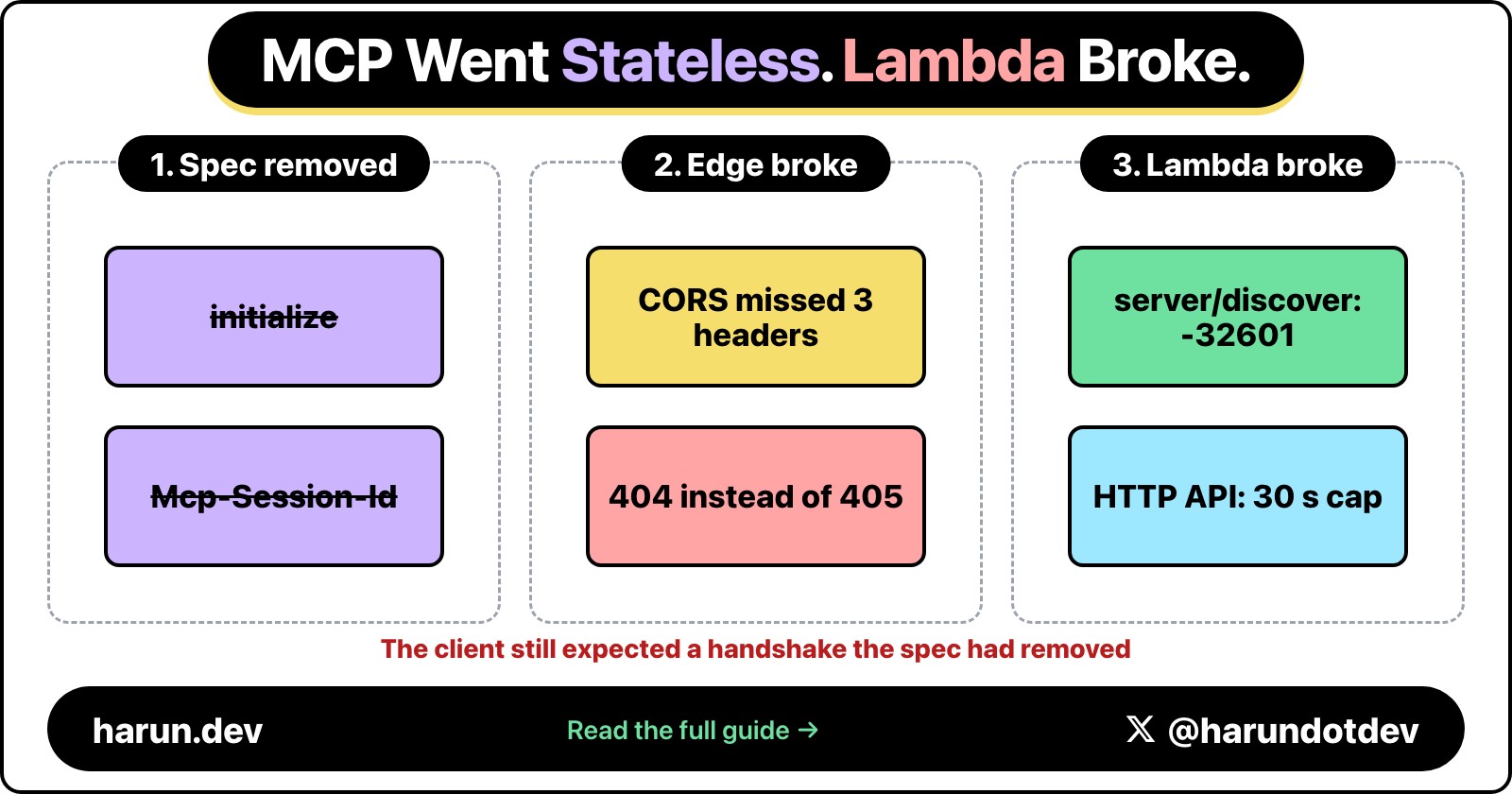
The 2026-07-28 MCP spec deleted the initialize handshake and Mcp-Session-Id, which should have been free for a Lambda server that was already stateless. It wasn't: a CORS allow-list, a missing server/discover, a 404 that should have been a 405, and a notification stream an HTTP API can't hold open all broke behind API Gateway.
Jul 25, 2026
A Bedrock-backed Fastify route on Lambda needs a contract after the model answers, not just before it. Zod on the output, RAG context treated as untrusted data, one repair pass then a 422, idempotent SQS, and the CloudWatch metrics that catch it drifting.
Jun 27, 2026
How to run long AI inference workloads on AWS Lambda MicroVMs with real cost controls, timeout handling, and concurrency management.
Aug 19, 2026
The 2026-07-28 MCP spec deleted the initialize handshake and Mcp-Session-Id, which should have been free for a Lambda server that was already stateless. It wasn't: a CORS allow-list, a missing server/discover, a 404 that should have been a 405, and a notification stream an HTTP API can't hold open all broke behind API Gateway.
Jul 25, 2026
A Bedrock-backed Fastify route on Lambda needs a contract after the model answers, not just before it. Zod on the output, RAG context treated as untrusted data, one repair pass then a 422, idempotent SQS, and the CloudWatch metrics that catch it drifting.
Jun 27, 2026
How to run long AI inference workloads on AWS Lambda MicroVMs with real cost controls, timeout handling, and concurrency management.
On this post
Comments
A reply stays under the note it answers.
No comments yet.
If you have a note on Serverless AI Inference API with AWS Bedrock and Lambda, sign in and leave it.