For years I deployed Lambda functions by zipping the dist folder on my laptop and running aws lambda update-function-code from a terminal. It worked. It also failed at 11pm on a Friday when I forgot to check which AWS profile was active and pushed staging code straight to production.
That was the night I stopped trusting myself with manual deploys.
So I rebuilt the pipeline from scratch. Terraform owns the infrastructure. GitHub Actions runs every plan and apply. AWS sees a short-lived OIDC token instead of some access key sitting in a repo secret forever. Pull requests get a Terraform plan posted as a comment. Merging to main deploys staging automatically. Production needs a human to click approve.
This post is the whole thing end to end: repo layout, the OIDC trust between GitHub and AWS, S3 remote state with DynamoDB locking, the deploy workflow, how Lambda code gets packaged, environment promotion with manual approval, and what I do when something bad still slips through.
It all runs in production right now. Names are sanitized, patterns are real.
Short answer: Terraform owns the Lambda infrastructure and GitHub Actions runs every plan and apply. The workflow assumes an AWS IAM role through GitHub OIDC, so no long-lived access keys sit in repo secrets. Merging to main deploys staging automatically, and production waits for a reviewer to approve it in a GitHub Environment.
 Photo by Wolfgang Weiser on Pexels
The repo structure
The repo has three concerns. Terraform for infrastructure, TypeScript handlers for Lambda, and the workflow files that glue the two together.
hrr-api/
├── .github/
│   └── workflows/
│       ├── plan.yml          # PR trigger, runs terraform plan
│       ├── deploy.yml        # main trigger, applies + deploys code
│       └── rollback.yml      # manual workflow_dispatch
├── infra/
│   ├── backend.tf            # S3 + DynamoDB backend config
│   ├── providers.tf          # aws provider, region, default tags
│   ├── oidc.tf               # GitHub OIDC provider + IAM role
│   ├── lambda.tf             # function, alias, log group, IAM
│   ├── api_gateway.tf        # HTTP API + routes
│   ├── variables.tf
│   ├── outputs.tf
│   └── envs/
│       ├── staging.tfvars
│       └── prod.tfvars
├── src/
│   ├── handlers/
│   │   ├── events.ts
│   │   └── webhook.ts
│   └── lib/
│       └── db.ts
├── package.json
├── tsconfig.json
└── esbuild.config.mjs
Two decisions in there that are worth explaining.
Staging and production both live in the same Terraform root, parameterized through .tfvars files. Same code path, different variables. Promoting a change means running the same plan against a different state key, instead of maintaining two copies of the config that slowly drift apart. I have watched that drift happen on older projects and it is miserable to untangle.
The Lambda source sits outside infra/ because the build artifact is environment-agnostic. One bundle, multiple deploy targets. Terraform points at the zip in S3 by key, and the deploy step uploads a new zip with a content-addressed name on every push.
Workflow files split by purpose. The plan workflow runs on pull requests and never touches anything. The deploy workflow runs on merge to main. The rollback workflow is a manual trigger you fire from the GitHub UI when something is on fire.
 Photo by Daniil Komov on Pexels
GitHub OIDC with AWS (no long-lived keys)
Most legacy pipelines I have inherited get this part wrong. They stash an AWS_ACCESS_KEY_ID and AWS_SECRET_ACCESS_KEY in GitHub secrets, the keys live forever, and one accidentally echoed log line is enough to compromise the whole account. I genuinely dislike having static AWS keys anywhere near a CI runner.
GitHub OIDC fixes it. Your workflow asks GitHub for a short-lived JWT, AWS verifies the JWT against a configured trust, and you get temporary credentials that expire in an hour. No static keys anywhere.
Setup is a one-time Terraform pass. First the OIDC provider.
# infra/oidc.tf

resource "aws_iam_openid_connect_provider" "hrr_github" {
  url            = "https://token.actions.githubusercontent.com"
  client_id_list = ["sts.amazonaws.com"]

  thumbprint_list = [
    "6938fd4d98bab03faadb97b34396831e3780aea1",
    "1c58a3a8518e8759bf075b76b750d4f2df264fcd",
  ]
}
The two thumbprints are the current GitHub Actions OIDC certificates. AWS also accepts the provider without thumbprints now because it validates the JWKS automatically, but I keep them pinned so the resource is explicit.
Then the IAM role that GitHub Actions assumes.
# infra/oidc.tf (continued)

variable "hrr_github_repo" {
  description = "owner/repo allowed to assume the deploy role"
  type        = string
}

data "aws_iam_policy_document" "hrr_github_trust" {
  statement {
    effect  = "Allow"
    actions = ["sts:AssumeRoleWithWebIdentity"]

    principals {
      type        = "Federated"
      identifiers = [aws_iam_openid_connect_provider.hrr_github.arn]
    }

    condition {
      test     = "StringEquals"
      variable = "token.actions.githubusercontent.com:aud"
      values   = ["sts.amazonaws.com"]
    }

    condition {
      test     = "StringLike"
      variable = "token.actions.githubusercontent.com:sub"
      values = [
        "repo:${var.hrr_github_repo}:ref:refs/heads/main",
        "repo:${var.hrr_github_repo}:pull_request",
        "repo:${var.hrr_github_repo}:environment:staging",
        "repo:${var.hrr_github_repo}:environment:prod",
      ]
    }
  }
}

resource "aws_iam_role" "hrr_github_deploy" {
  name               = "hrr-github-deploy"
  assume_role_policy = data.aws_iam_policy_document.hrr_github_trust.json
}

resource "aws_iam_role_policy_attachment" "hrr_github_deploy_power" {
  role       = aws_iam_role.hrr_github_deploy.name
  policy_arn = aws_iam_policy.hrr_deploy_permissions.arn
}
The sub condition is the security boundary. It says: only GitHub Actions runs from this exact repository, on the main branch, on pull requests, or inside the staging/prod environments are allowed to assume the role. A workflow in a different repo cannot get credentials, even if it somehow knows the role ARN.
If you want to scope by tag or other filters, the OIDC sub claim supports more granular patterns. The GitHub docs page on OIDC has the full list. For most setups, the four patterns above are plenty.
The permission policy attached to the role is a separate document tuned to what your pipeline actually touches. In my case that is Lambda, IAM passrole for the Lambda execution role, S3 for the artifact bucket, CloudWatch Logs, API Gateway, and DynamoDB for the state lock. Resist the urge to slap AdministratorAccess on it. Spend the hour writing a least-privilege policy. Future you will thank present you.
 Photo by cottonbro CG studio on Pexels
Terraform remote state with locking
Local Terraform state on a dev laptop is fine for a weekend project. For a team or a CI pipeline, you need remote state with a lock, otherwise two parallel terraform apply runs will race each other and corrupt the state file. I have seen this happen exactly once and it took an afternoon to untangle.
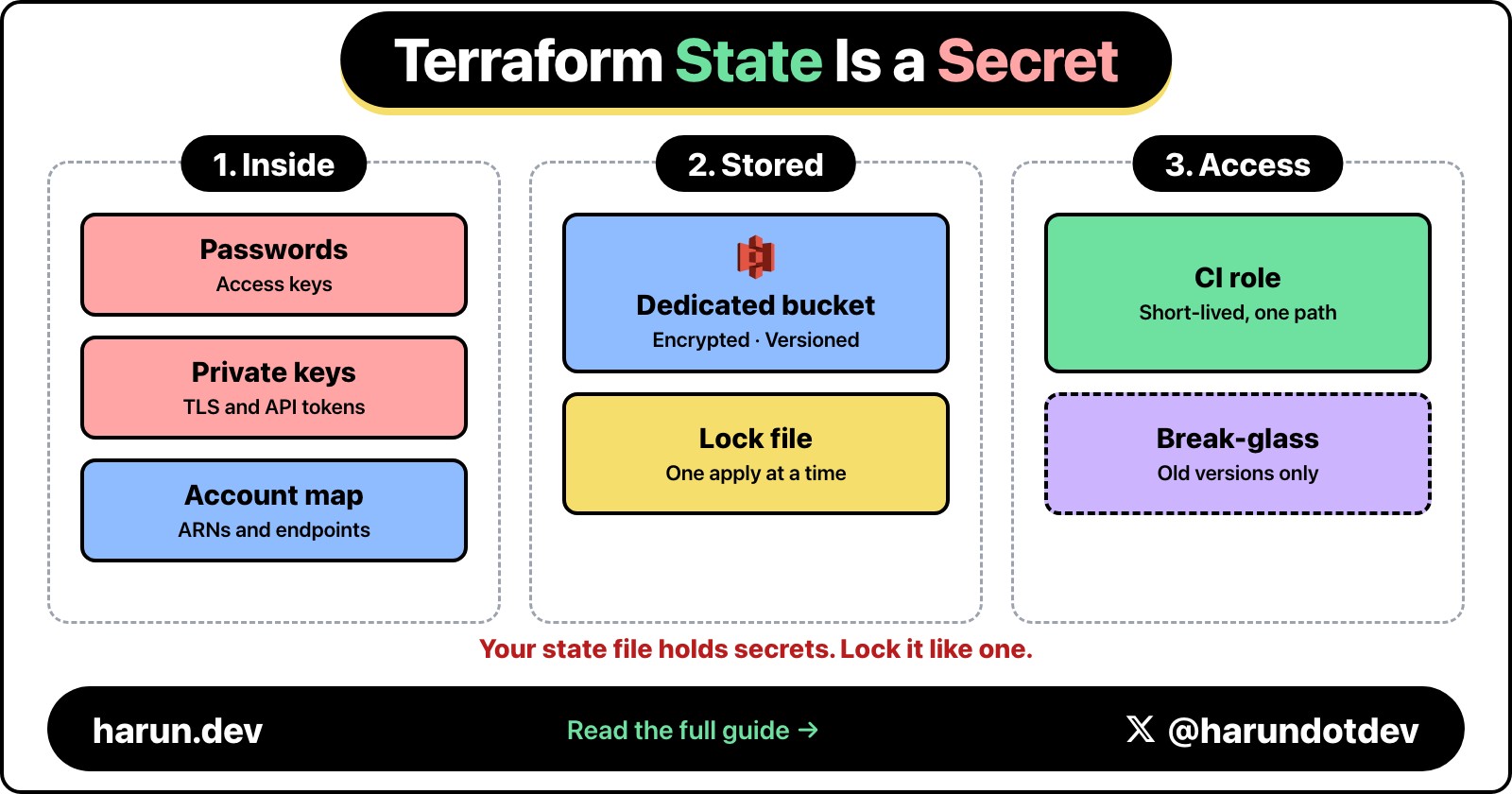
S3 holds the state. DynamoDB handles the lock.
# infra/backend.tf

terraform {
  required_version = ">= 1.6.0"

  backend "s3" {
    bucket         = "hrr-tf-state"
    key            = "api/terraform.tfstate"
    region         = "eu-west-1"
    dynamodb_table = "hrr-tf-locks"
    encrypt        = true
  }

  required_providers {
    aws = {
      source  = "hashicorp/aws"
      version = "~> 5.40"
    }
  }
}
The S3 bucket and DynamoDB table have to exist before terraform init runs. I bootstrap them once with a tiny separate Terraform module that lives in a bootstrap/ directory and is never touched again.
# bootstrap/main.tf

resource "aws_s3_bucket" "hrr_tf_state" {
  bucket = "hrr-tf-state"
}

resource "aws_s3_bucket_versioning" "hrr_tf_state" {
  bucket = aws_s3_bucket.hrr_tf_state.id

  versioning_configuration {
    status = "Enabled"
  }
}

resource "aws_s3_bucket_server_side_encryption_configuration" "hrr_tf_state" {
  bucket = aws_s3_bucket.hrr_tf_state.id

  rule {
    apply_server_side_encryption_by_default {
      sse_algorithm = "AES256"
    }
  }
}

resource "aws_s3_bucket_public_access_block" "hrr_tf_state" {
  bucket                  = aws_s3_bucket.hrr_tf_state.id
  block_public_acls       = true
  block_public_policy     = true
  ignore_public_acls      = true
  restrict_public_buckets = true
}

resource "aws_dynamodb_table" "hrr_tf_locks" {
  name         = "hrr-tf-locks"
  billing_mode = "PAY_PER_REQUEST"
  hash_key     = "LockID"

  attribute {
    name = "LockID"
    type = "S"
  }
}
Versioning on the state bucket matters more than people realize. If something corrupts the state file, you can roll back to the previous object version and recover. Without versioning, a bad state push is gone for good.
Lock down who can read this bucket too, because Terraform state is more sensitive than your .env file and can hold passwords and access keys.
DynamoDB on-demand is the right billing mode here. State locks are infrequent, so on-demand costs basically nothing. Provisioned capacity would burn money sitting idle.
Workspaces or separate state keys are both valid for staging vs prod. I use separate state keys (api/staging/terraform.tfstate and api/prod/terraform.tfstate) passed via -backend-config at init time. Workspaces and the data sources you build on top of them get awkward fast, and I would rather be explicit.
 Photo by Brett Sayles on Pexels
The deploy workflow
This runs on every push to main. It applies infrastructure changes and ships new Lambda code.
# .github/workflows/deploy.yml

name: deploy

on:
  push:
    branches: [main]

permissions:
  id-token: write   # required for OIDC
  contents: read

concurrency:
  group: deploy-${{ github.ref }}
  cancel-in-progress: false

jobs:
  build:
    runs-on: ubuntu-latest
    outputs:
      artifact_key: ${{ steps.pack.outputs.key }}
    steps:
      - uses: actions/checkout@v4

      - uses: actions/setup-node@v4
        with:
          node-version: '20'
          cache: 'npm'

      - run: npm ci

      - name: Bundle handlers
        run: npm run build

      - name: Package zip
        id: pack
        run: |
          cd dist
          zip -qr ../lambda.zip .
          cd ..
          KEY="lambda/${GITHUB_SHA}.zip"
          echo "key=\(KEY" >> "\)GITHUB_OUTPUT"

      - uses: actions/upload-artifact@v4
        with:
          name: lambda-bundle
          path: lambda.zip
          retention-days: 7

  deploy_staging:
    needs: build
    runs-on: ubuntu-latest
    environment: staging
    steps:
      - uses: actions/checkout@v4

      - uses: actions/download-artifact@v4
        with:
          name: lambda-bundle

      - uses: aws-actions/configure-aws-credentials@v4
        with:
          role-to-assume: arn:aws:iam::111111111111:role/hrr-github-deploy
          aws-region: eu-west-1

      - name: Upload artifact to S3
        run: |
          aws s3 cp lambda.zip \
            "s3://hrr-artifacts/${{ needs.build.outputs.artifact_key }}"

      - uses: hashicorp/setup-terraform@v3
        with:
          terraform_version: 1.7.5

      - name: Terraform init (staging)
        working-directory: infra
        run: |
          terraform init \
            -backend-config="key=api/staging/terraform.tfstate"

      - name: Terraform apply (staging)
        working-directory: infra
        run: |
          terraform apply -auto-approve \
            -var-file=envs/staging.tfvars \
            -var="lambda_artifact_key=${{ needs.build.outputs.artifact_key }}"

      - name: Smoke test
        run: |
          curl -fsS https://staging-api.hrr.dev/health

  deploy_prod:
    needs: deploy_staging
    runs-on: ubuntu-latest
    environment: prod
    steps:
      - uses: actions/checkout@v4

      - uses: aws-actions/configure-aws-credentials@v4
        with:
          role-to-assume: arn:aws:iam::222222222222:role/hrr-github-deploy
          aws-region: eu-west-1

      - uses: hashicorp/setup-terraform@v3
        with:
          terraform_version: 1.7.5

      - name: Terraform init (prod)
        working-directory: infra
        run: |
          terraform init \
            -backend-config="key=api/prod/terraform.tfstate"

      - name: Terraform apply (prod)
        working-directory: infra
        run: |
          terraform apply -auto-approve \
            -var-file=envs/prod.tfvars \
            -var="lambda_artifact_key=${{ needs.build.outputs.artifact_key }}"

      - name: Smoke test
        run: |
          curl -fsS https://api.hrr.dev/health
Some bits in that YAML worth calling out.
The permissions block at the top is mandatory for OIDC. Without id-token: write, GitHub will not mint a token and the AWS credentials step fails on the first run with a fairly cryptic error. Setting contents: read keeps the token scoped to the minimum the workflow needs.
The concurrency group stops two deploys from racing on the same branch. Push twice in 30 seconds and the second push waits for the first to finish. Set cancel-in-progress: false so a partial apply finishes before the next one starts. Cancelling halfway through a Terraform apply is a great way to end up with broken state, and yes, I learned that the hard way.
The artifact key uses the commit SHA. Every deploy gets a unique S3 object, so rolling back is just pointing the Lambda at an older key. More on that in a minute.
There is also a separate plan.yml workflow for pull requests. It runs terraform plan and posts the output as a PR comment so reviewers can see exactly what infrastructure will change before merging. I use tfcmt for the comment formatting because the raw plan output is too noisy for a PR review.
 Photo by RealToughCandy.com on Pexels
Lambda code packaging
Node.js Lambda packaging has a few sharp edges. You want a small zip, no dev dependencies, and your bundler should resolve everything ahead of time so cold starts do not pay for module resolution.
I use esbuild. One bundle per handler, externalize @aws-sdk/* because the runtime already provides it, target Node 20.
// esbuild.config.mjs

import { build } from 'esbuild';
import { readdirSync } from 'fs';

const handlers = readdirSync('src/handlers').filter((f) =>
  f.endsWith('.ts')
);

await build({
  entryPoints: handlers.map((h) => `src/handlers/${h}`),
  bundle: true,
  platform: 'node',
  target: 'node20',
  format: 'esm',
  outdir: 'dist',
  outExtension: { '.js': '.mjs' },
  external: ['@aws-sdk/*'],
  minify: true,
  sourcemap: 'linked',
  banner: {
    js: "import { createRequire } from 'module'; const require = createRequire(import.meta.url);",
  },
});

console.log(`Bundled ${handlers.length} handlers`);
The createRequire banner is the workaround for any CommonJS dependency that sneaks into an ESM bundle. Without it, things like pg blow up at runtime because they expect require to exist. The error message when this happens is not obvious, so keep the banner in even if you think you do not need it yet.
Externalizing @aws-sdk/* cuts the bundle size dramatically. The AWS SDK v3 is huge, and the Node 20 Lambda runtime ships it for you. Bundling your own copy just makes cold starts slower for no reason.
The Terraform side references the artifact key as a variable.
# infra/lambda.tf

variable "lambda_artifact_key" {
  description = "S3 key for the lambda zip, e.g. lambda/<sha>.zip"
  type        = string
}

resource "aws_lambda_function" "hrr_api" {
  function_name = "hrr-api"
  role          = aws_iam_role.hrr_lambda_exec.arn
  s3_bucket     = "hrr-artifacts"
  s3_key        = var.lambda_artifact_key
  handler       = "events.handler"
  runtime       = "nodejs20.x"
  timeout       = 10
  memory_size   = 512

  publish = true   # publishes a new version on every code change

  environment {
    variables = {
      NODE_OPTIONS = "--enable-source-maps"
      LOG_LEVEL    = var.log_level
    }
  }

  tracing_config {
    mode = "Active"
  }
}
The publish = true flag is what makes rollback easy. Every deploy creates a new Lambda version. You never overwrite $LATEST in place.
For functions over 50MB zipped (or 250MB unzipped), you have to use S3 anyway. For smaller ones, you can pass the zip directly to Terraform with filename, but I always go through S3. It decouples the build from the apply, makes the Terraform diff cleaner (the key changes, not a base64 blob), and gives you a deploy artifact you can audit later.
 Photo by Mikhail Nilov on Pexels
Environment promotion with manual approval
Staging deploys automatically. Production deploys when a human clicks approve. GitHub Environments make this almost free to set up.
In the GitHub UI, go to Settings -> Environments and create two environments.
- staging with no protection rules. Anything that reaches the staging job runs right away.
- prod with required reviewers. Add yourself and any teammate who can approve a production deploy. Restrict deployments to the
main branch while you are in there.
The workflow above already references both environments via environment: staging and environment: prod on the respective jobs. When the prod job tries to start, GitHub pauses it and notifies the configured reviewers. They can read the build logs, check the staging smoke test, and click approve or reject.
Three extra knobs that earn their keep.
A wait timer. Set a 5 or 10 minute wait on the prod environment if you want a soak period in staging before the approval prompt even appears. This catches the "we just deployed staging and now error rates are spiking" case before anyone is tempted to rubber-stamp prod.
Branch protection. Restrict the prod environment to the main branch under "Deployment branches". Otherwise someone could push a feature branch with an environment trigger and get a prod approval prompt for code that never went through review. That one has bitten me.
Per-environment secrets. Each environment has its own secret store. Staging holds the staging AWS account role ARN, prod holds the prod role ARN. A workflow running in the staging environment cannot read prod secrets, even if the YAML asks for them.
The combined effect is a pipeline where every push to main runs the build and deploys to staging in 4 to 5 minutes, the staging smoke test gates the prod approval (if staging is broken, prod never gets prompted), and production deploys only happen when a named reviewer clicks the button.
That last point is what keeps me sane. There is always a human in the loop for production, but they are reviewing a deploy that has already passed every automated gate, not driving the deploy themselves.
 Photo by Tolga deniz Aran on Pexels
Rollback strategy
Any pipeline can deploy bad code. So can the most careful review process. The real question is how fast you can undo it.
The Lambda alias pattern gives you instant rollback. Instead of pointing API Gateway at the function directly, you point it at an alias, and the alias points at a specific version. Rolling back is just updating the alias to point at the previous version. No rebuild, no fresh zip, no S3 round trip required.
# infra/lambda.tf (continued)

resource "aws_lambda_alias" "hrr_api_live" {
  name             = "live"
  function_name    = aws_lambda_function.hrr_api.function_name
  function_version = aws_lambda_function.hrr_api.version
}

resource "aws_apigatewayv2_integration" "hrr_api" {
  api_id                 = aws_apigatewayv2_api.hrr_api.id
  integration_type       = "AWS_PROXY"
  integration_uri        = aws_lambda_alias.hrr_api_live.invoke_arn
  payload_format_version = "2.0"
}
The API Gateway integration always invokes hrr-api:live. The alias decides which version actually runs. On every deploy, Terraform updates the alias to the newly published version.
For instant rollback, I keep a separate manual workflow.
# .github/workflows/rollback.yml

name: rollback

on:
  workflow_dispatch:
    inputs:
      environment:
        description: 'Target environment'
        required: true
        type: choice
        options: [staging, prod]
      version:
        description: 'Lambda version to roll back to (e.g. 47)'
        required: true
        type: string

permissions:
  id-token: write
  contents: read

jobs:
  rollback:
    runs-on: ubuntu-latest
    environment: ${{ inputs.environment }}
    steps:
      - uses: aws-actions/configure-aws-credentials@v4
        with:
          role-to-assume: ${{ vars.HRR_DEPLOY_ROLE_ARN }}
          aws-region: eu-west-1

      - name: Point alias at older version
        run: |
          aws lambda update-alias \
            --function-name hrr-api \
            --name live \
            --function-version "${{ inputs.version }}"

      - name: Verify
        run: |
          aws lambda get-alias \
            --function-name hrr-api \
            --name live \
            --query 'FunctionVersion' \
            --output text
You fire this from the GitHub UI under Actions -> rollback -> Run workflow. Pick the environment, type the version number you want to revert to (you can find it in the Lambda console or from the previous deploy logs), and click run. The rollback takes about 15 seconds end to end, which is the part I love. When prod is broken, every second of panic feels like an hour.
The trade-off: this rollback drifts from Terraform state. Terraform thinks live points at version 50, but it actually points at version 47. The next terraform apply will quietly move it back to 50 unless you also revert the code change in git. The right recovery flow is rollback the alias for the immediate fix, then revert the offending commit so the next deploy puts the world back in a consistent state.
For larger setups, CodeDeploy with traffic shifting (linear, canary) gives you progressive rollout and automatic rollback on CloudWatch alarms. It is more moving parts and only worth wiring up once your traffic is high enough that a 5-minute bad deploy actually hurts customers. For most APIs I have shipped, the alias swap is enough.
 Photo by DS stories on Pexels
Cost and speed
Actual numbers from this exact pipeline, averaged over the last few months of running it.
Build job: around 45 to 60 seconds. npm ci is 25 seconds with the cache warm, esbuild is 4 to 5 seconds for a dozen handlers, zip and upload are negligible.
Staging deploy: around 90 to 110 seconds total. terraform init is 8 to 10 seconds, terraform apply is 30 to 45 seconds (most of which is Lambda update propagation and API Gateway redeploy), the smoke test is 2 seconds.
Prod deploy: same shape as staging, plus however long it takes a reviewer to click approve. Once approved, another 90 seconds.
End to end, a green push to main is in staging within 3 minutes. After approval, prod is live within 5 minutes of the original commit.
On cost: GitHub Actions minutes for a public repo are free. For a private repo, you get 2,000 free minutes per month on the Free plan and this pipeline burns about 5 minutes per deploy. So 400 deploys per month before you pay anything extra. AWS charges are basically zero. A few cents per month for the S3 state bucket, a few cents for DynamoDB on-demand requests, and the artifact bucket holds about 200KB per deploy SHA so storage costs are noise.
The expensive part of this whole setup is not the pipeline. It is the IAM permissions on the deploy role. Spend the time to scope them down. A leaked OIDC trust with AdministratorAccess is just as dangerous as a leaked access key. The only difference is the attack window is shorter.
 Photo by Gezer Amorim on Pexels
What I learned
Things I did not get right on the first try, in no particular order.
Pin everything. Pin the Terraform version, the AWS provider version, the Node version, the action versions. @v4 is fine for first-party actions, but a community action pinned to @main is a supply chain attack waiting to happen. Use commit SHAs for anything sensitive.
Test the OIDC trust before you delete the access keys. I once flipped a pipeline to OIDC, deleted the IAM user, and found out three workflows on a different branch were still using the old keys. Run both in parallel for a week, watch the CloudTrail logs, then turn off the static keys.
Plan output as a PR comment is non-negotiable for teams. If reviewers cannot see what infrastructure a PR is about to change, they will rubber-stamp it. Put the plan in front of them, in the review where they are already paying attention.
Smoke tests catch more than you think. The 2-second curl /health after every deploy has caught a broken environment variable, a missing IAM permission, and a Lambda that was throwing on cold start because of a bundling bug. Two lines of YAML, hours of saved debugging. Easiest ROI in the whole pipeline.
Keep one deploy path. It is tempting to add a "quick deploy" script that skips Terraform for code-only changes. Do not do it. Every shortcut eventually becomes the path that breaks production at 11pm on a Friday. One deploy path, used for every change, even one-line typo fixes.
 Photo by Max Fischer on Pexels
Wrapping up
Setting up CI/CD for Lambda and Terraform feels overwhelming when you stare at a blank repo, but each piece is small. The OIDC trust is one Terraform file. The remote state is another. The deploy workflow is one YAML file. Stitched together you get a pipeline that ships code safely without keeping any long-lived AWS credentials anywhere near your repo.
The setup pays for itself the first time you push a hotfix at midnight and it lands in production in 5 minutes without you ever opening a terminal. That moment alone was worth the weekend I spent wiring it up.
FAQ
How do I deploy Lambda from GitHub Actions without AWS access keys?
Use GitHub OIDC. Create an aws_iam_openid_connect_provider for token.actions.githubusercontent.com, then an IAM role whose trust policy checks the aud claim and limits the sub claim to your own repo's main branch, pull requests, and deploy environments. In the workflow, set id-token: write and pass the role to aws-actions/configure-aws-credentials. The credentials expire in an hour.
Why does configure-aws-credentials fail on the first OIDC run?
Check the permissions block. Without id-token: write, GitHub won't mint a token and the AWS credentials step fails with a fairly cryptic error.
How do I roll back a Lambda deploy made by Terraform?
Publish a new version on every deploy with publish = true and point API Gateway at a live alias. My rollback workflow runs aws lambda update-alias to an older version in about 15 seconds. Revert the bad commit right after, or the next terraform apply moves the alias forward again.
How much does this pipeline cost?
Actions minutes are free on public repos. On a private repo, the Free plan's 2,000 minutes cover about 400 deploys at roughly 5 minutes each. The AWS side is a few cents a month for the state bucket and DynamoDB lock requests.
Hope you enjoyed this walkthrough. If you are setting up something similar or have questions about any of the patterns above, drop a comment below.
Follow me on Twitter/X for more posts about AWS, serverless architecture, and building SaaS products.
 Photo by ThisIsEngineering on Pexels
On this post
Comments
A reply stays under the note it answers.
No comments yet.
If you have a note on GitHub Actions + Terraform CI/CD for AWS Lambda with OIDC, sign in and leave it.